
How to Add Regional Pricing to Your Framer Site
Losing international Framer sales? Here's how to add Purchasing Power Parity (PPP) discounts and show location-based pricing to visitors in 5 minutes.
What is Purchasing Power Parity (PPP)?
PPP is an economic measure of what currencies can actually buy in their local economies. A $99 product may be affordable in the US but represent 15% of a monthly salary in India or Brazil. Framer PPP discounts adjust the price international visitors see so your pricing reflects real local purchasing power, not just exchange rates.
For the general guide that works on any website, see Country-Based Pricing: The Ultimate Guide. Why this works: Why Your Online Business Needs Parity Pricing.
Why International Visitors Aren't Buying
Your $99 offer might be affordable in the US, but in countries like India, Brazil, or the Philippines, that same price represents 10-15% of someone's monthly income. You're not losing sales because your offer isn't valuable. You're losing them because of purchasing power parity (PPP) differences between countries.
The Solution: Parity Pricing Banners
Instead of manually creating different coupon codes or managing multiple pricing schemes, you can show smart discount banners based on where your visitors are located. When someone from Brazil visits your Framer site, they see a 30% discount offer. Someone from the US sees your regular price.
This approach is called purchasing power parity (PPP) pricing, and Framer site owners using this regional pricing strategy report 20-30% increases in international sales.
How to Set It Up on Framer (5 minutes)
What you need:
- Your Framer project (admin access)
- A free account at Evendeals.com
- 5 minutes
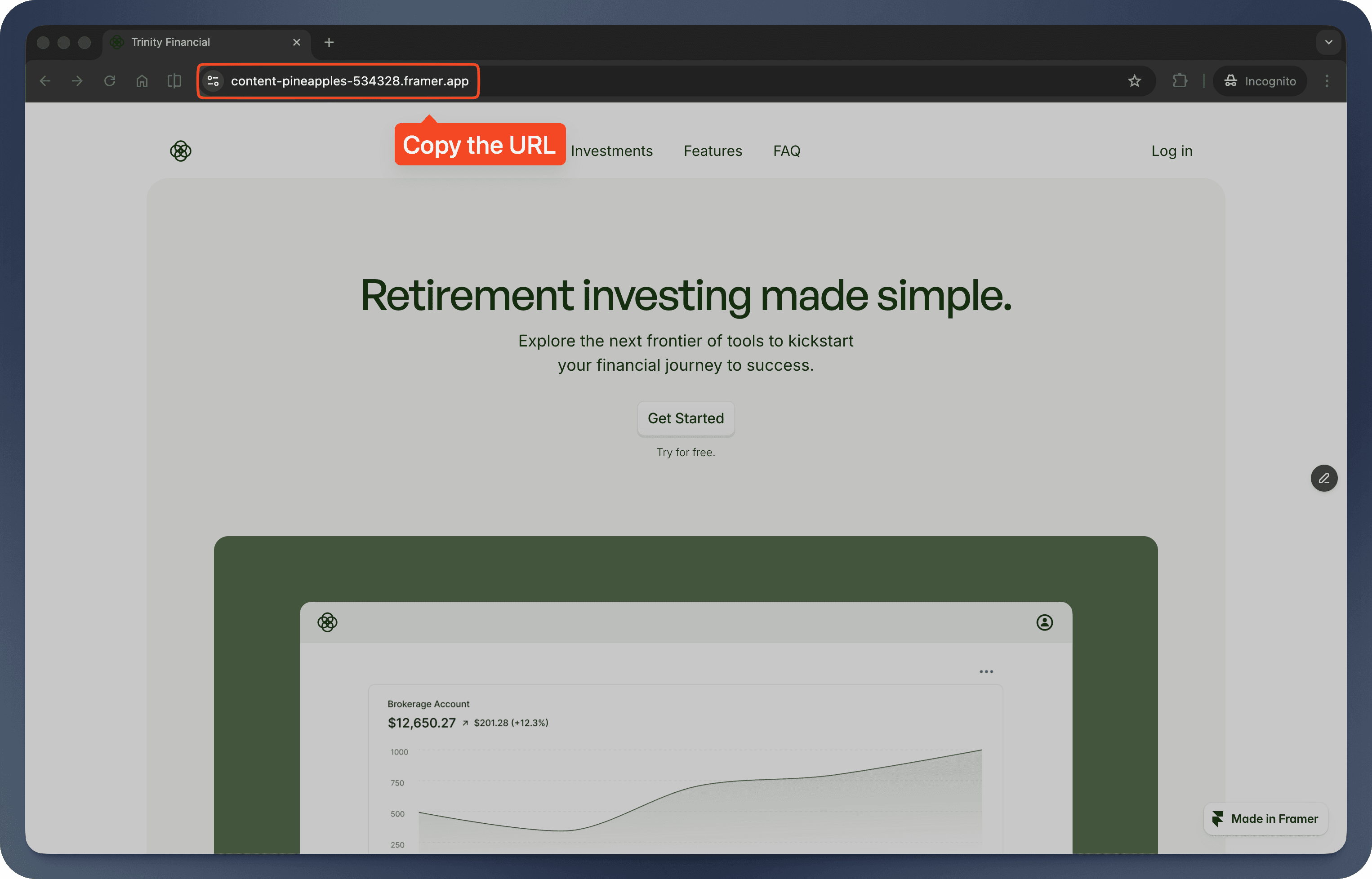
Step 1: Get Your Page URL from Framer
- Open your Framer project and publish your site
- Open the page where you want the banner (pricing, sales, or checkout) in your browser
- Copy the full URL from your browser's address bar (e.g.,
https://yoursite.com/pricing)
Step 2: Set Up Evendeals
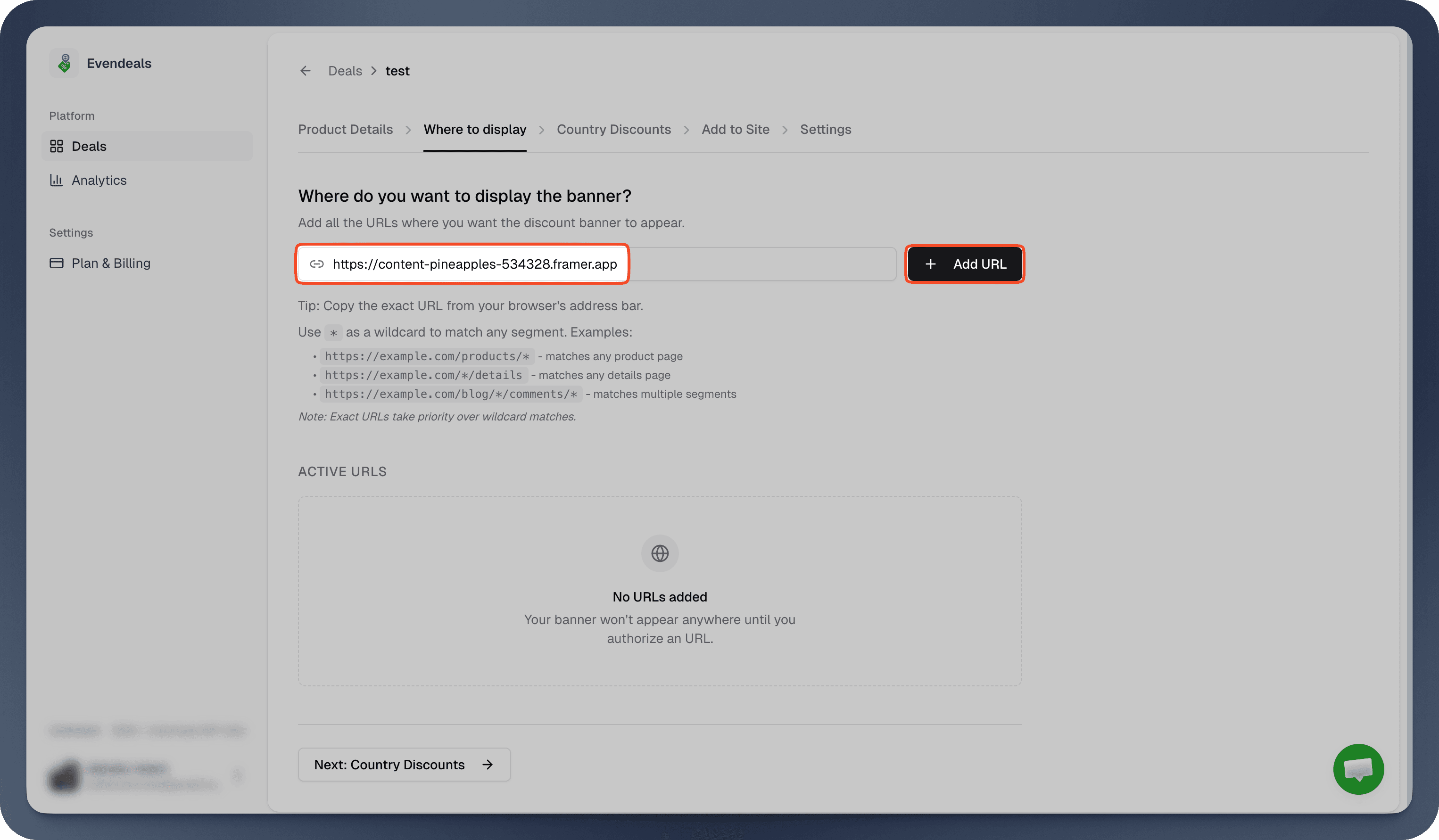
- Sign up at evendeals.com (free account available)
- Create a new deal and go to Where to display
- Paste your Framer page URL
- Click Add URL
Step 3: Create Coupons
Option A: Payment provider integration (recommended): If you use Stripe, Lemon Squeezy, Dodo Payments, Creem, Polar, WooCommerce, or FastSpring, connect your account in Evendeals and coupons are created automatically when you sync.
Option B: Manual setup: Evendeals works with any payment or checkout system that supports coupon codes (Lemon Squeezy, Paddle, etc.). Create discount codes in your payment provider so they apply at checkout.
- In your payment provider, create coupon codes for different regions
- Example:
15OFF(15%),30OFF(30%),50OFF(50%) - Make sure the codes apply to the products or plans you sell on the Framer page
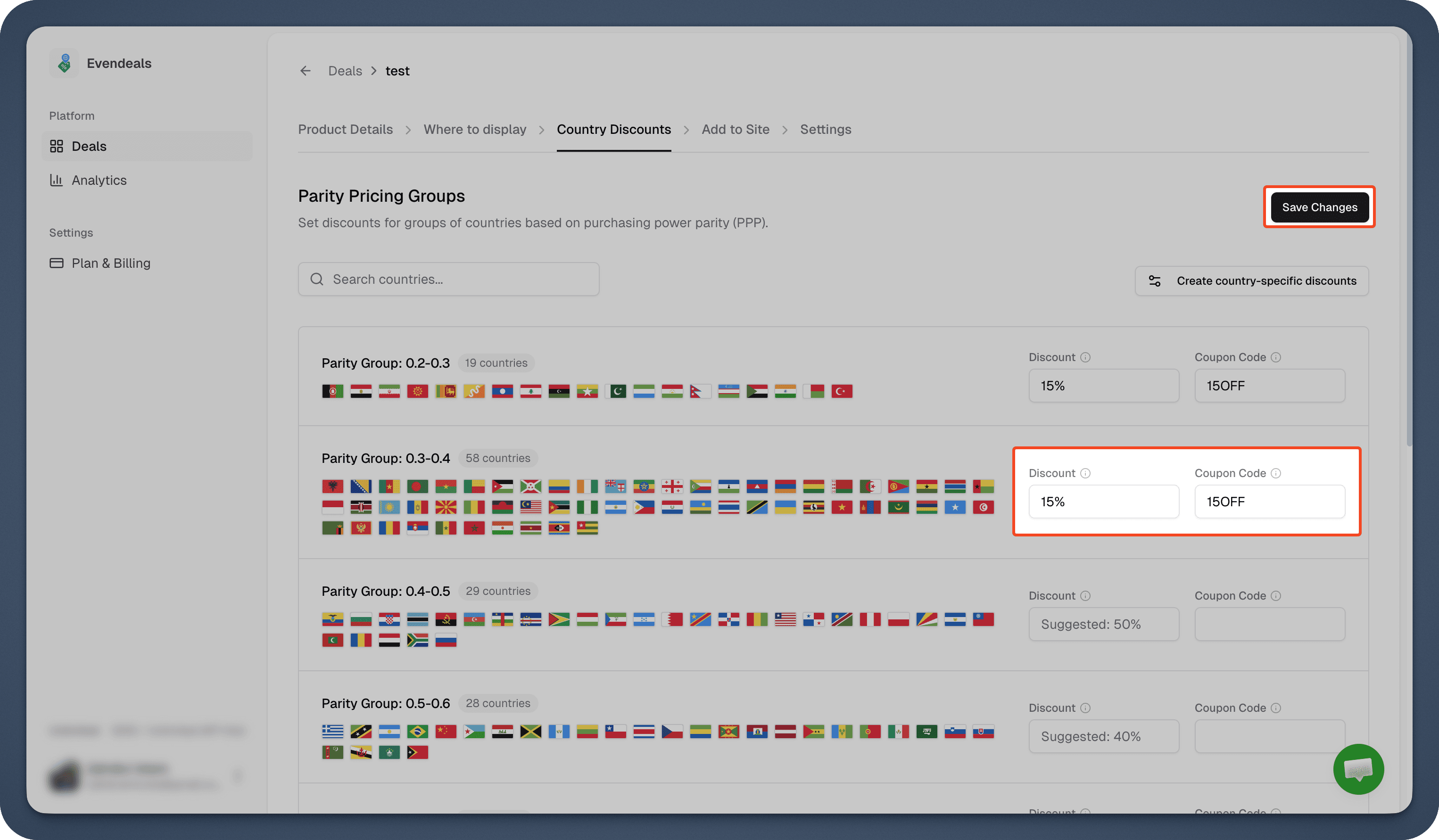
Step 4: Configure Country Discounts in Evendeals
- Go to Country Discounts in Evendeals
- Set discount percentages and enter the coupon code for each country group (e.g., 15% with
15OFF, 50% with50OFF) - Click Save Changes
Note: The coupon codes in Evendeals must match exactly what you created in your payment provider.
Not sure what discount to set per country? This table gives you a starting point based on PPP tiers:
| Income tier | Example countries | Suggested PPP discount |
|---|---|---|
| High income | US, UK, Germany, Australia, Canada | 0% (standard price) |
| Upper-middle income | Brazil, Mexico, Turkey, South Africa, Malaysia | 15-25% |
| Lower-middle income | India, Philippines, Vietnam, Nigeria, Indonesia | 30-50% |
You can adjust these anytime. Most Framer site owners start conservative and increase discounts for regions that still are not converting.
Step 5: Customize Your Banner
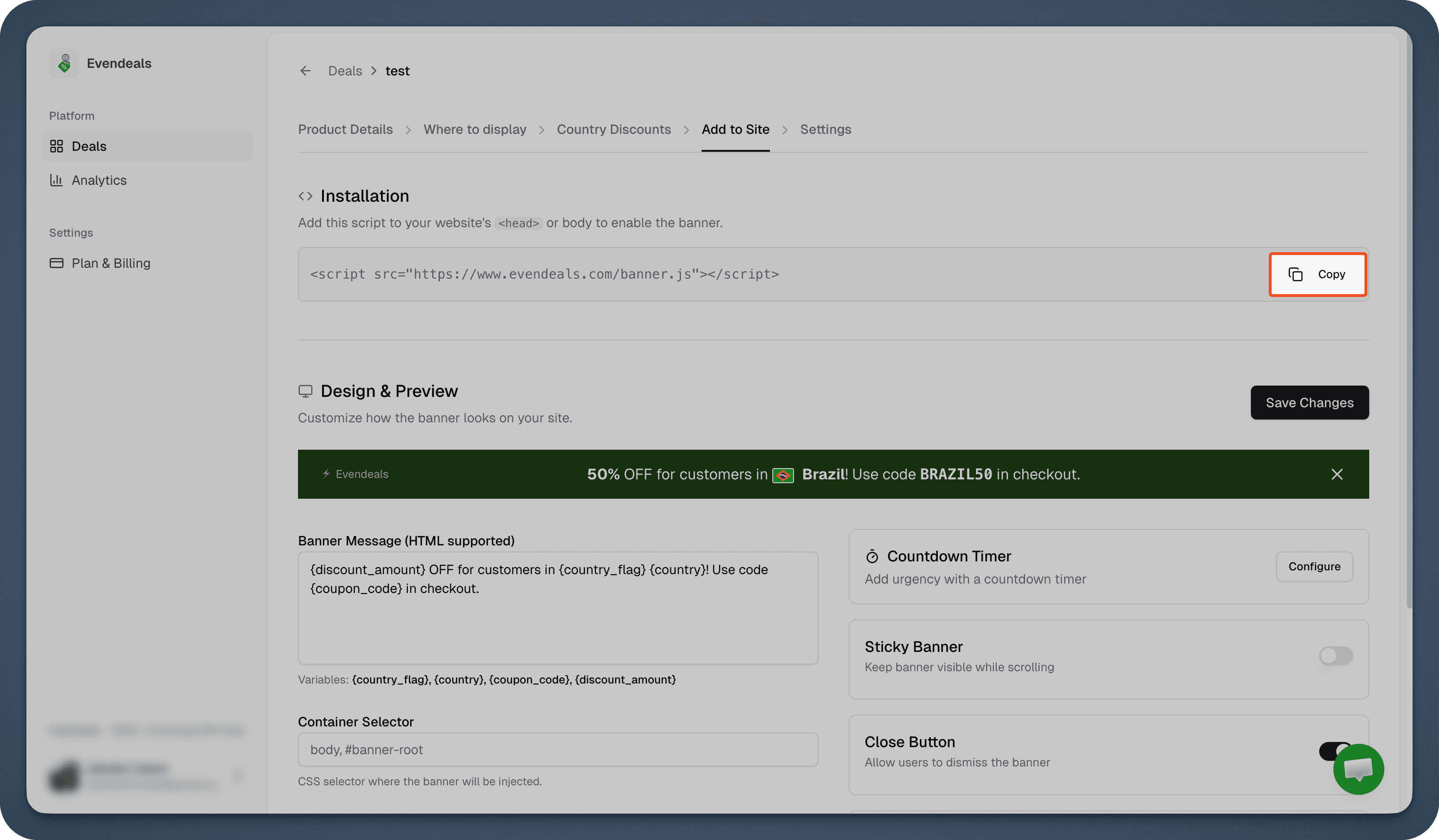
- Go to Add to Site tab in Evendeals
- Design your banner: customize colors to match your Framer site, edit the message, preview how it looks
- Copy the installation script
Step 6: Install on Framer
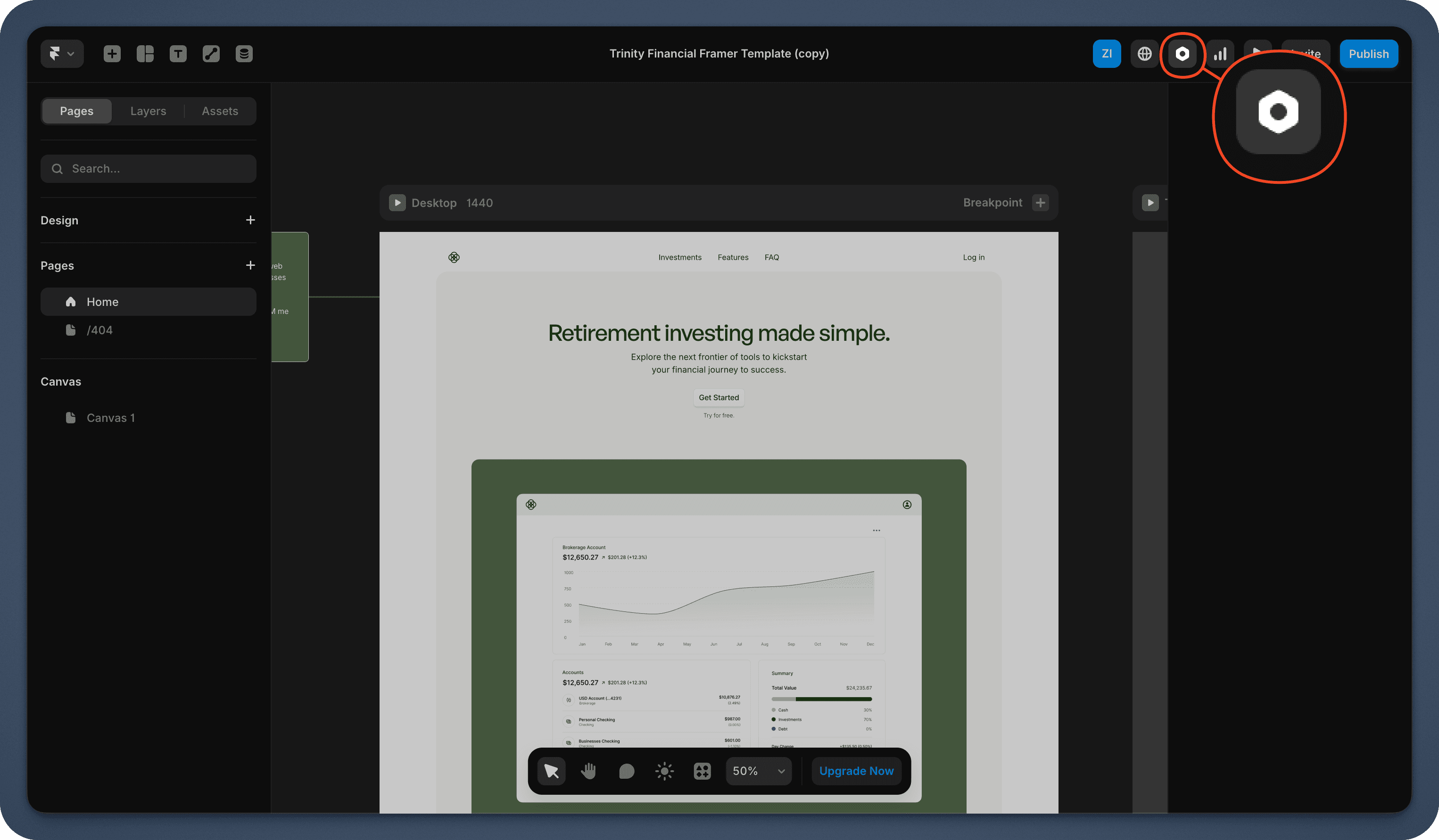
- In Framer, open your project and go to Project Settings (gear icon)
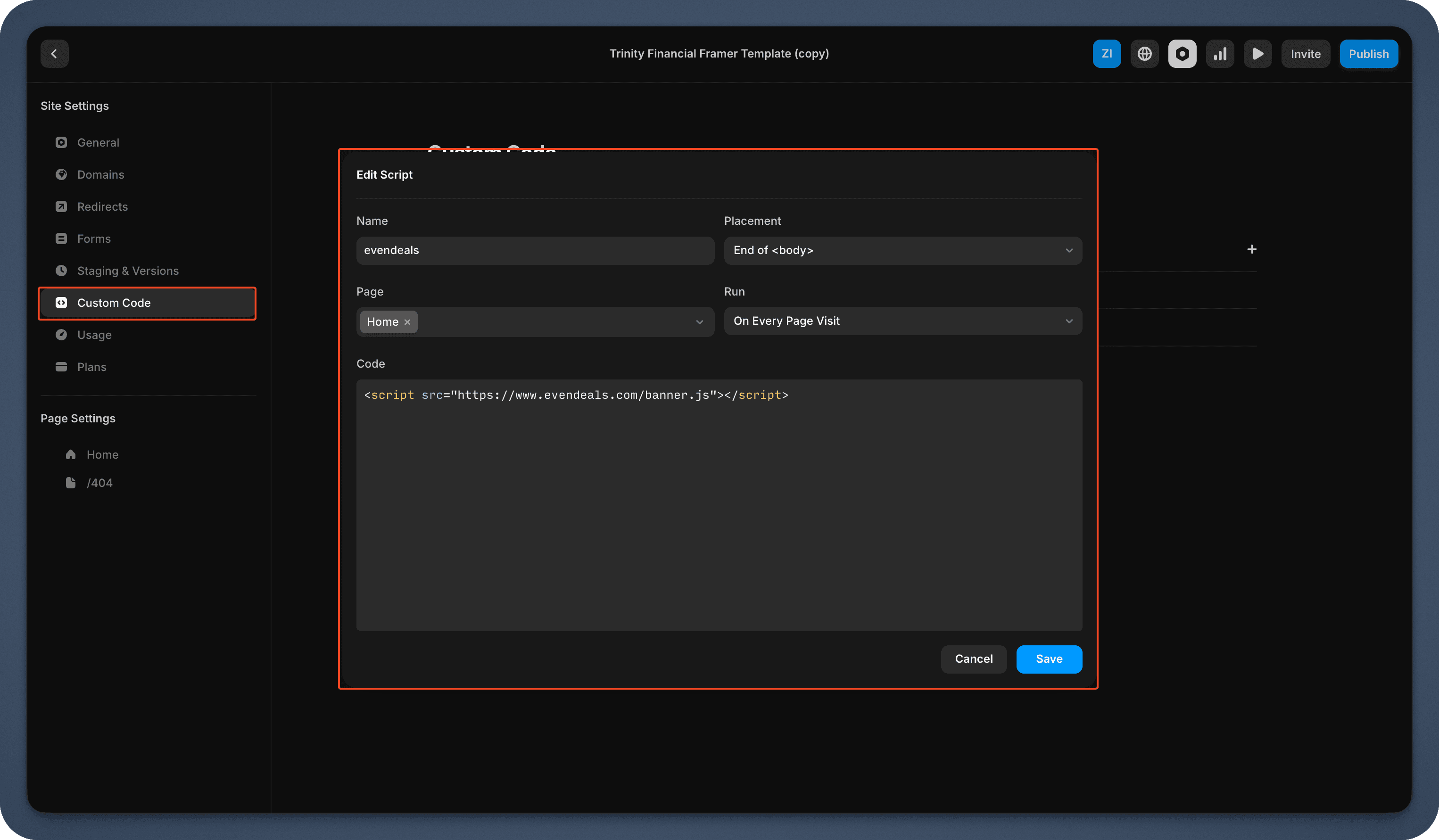
- Click the Custom Code tab
- Click Add Script and give it a name (e.g., "Evendeals")
- Choose bodyEnd so the script loads at the end of the page
- Paste the Evendeals script into the code field
- Leave "Apply to" as all pages, or select only the pages where you want the banner
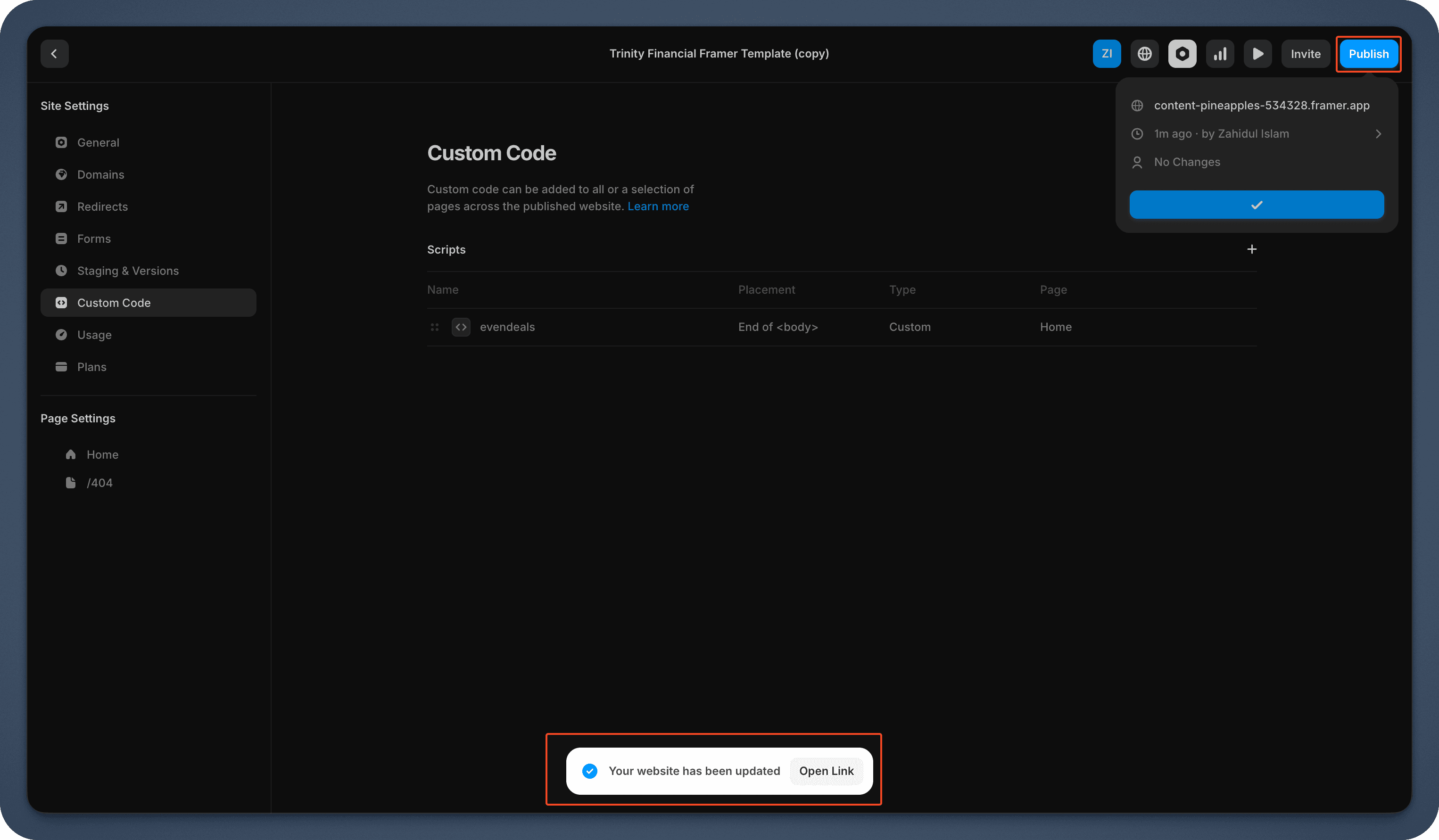
- Save and republish your site
Done! Your banner now shows to international visitors.
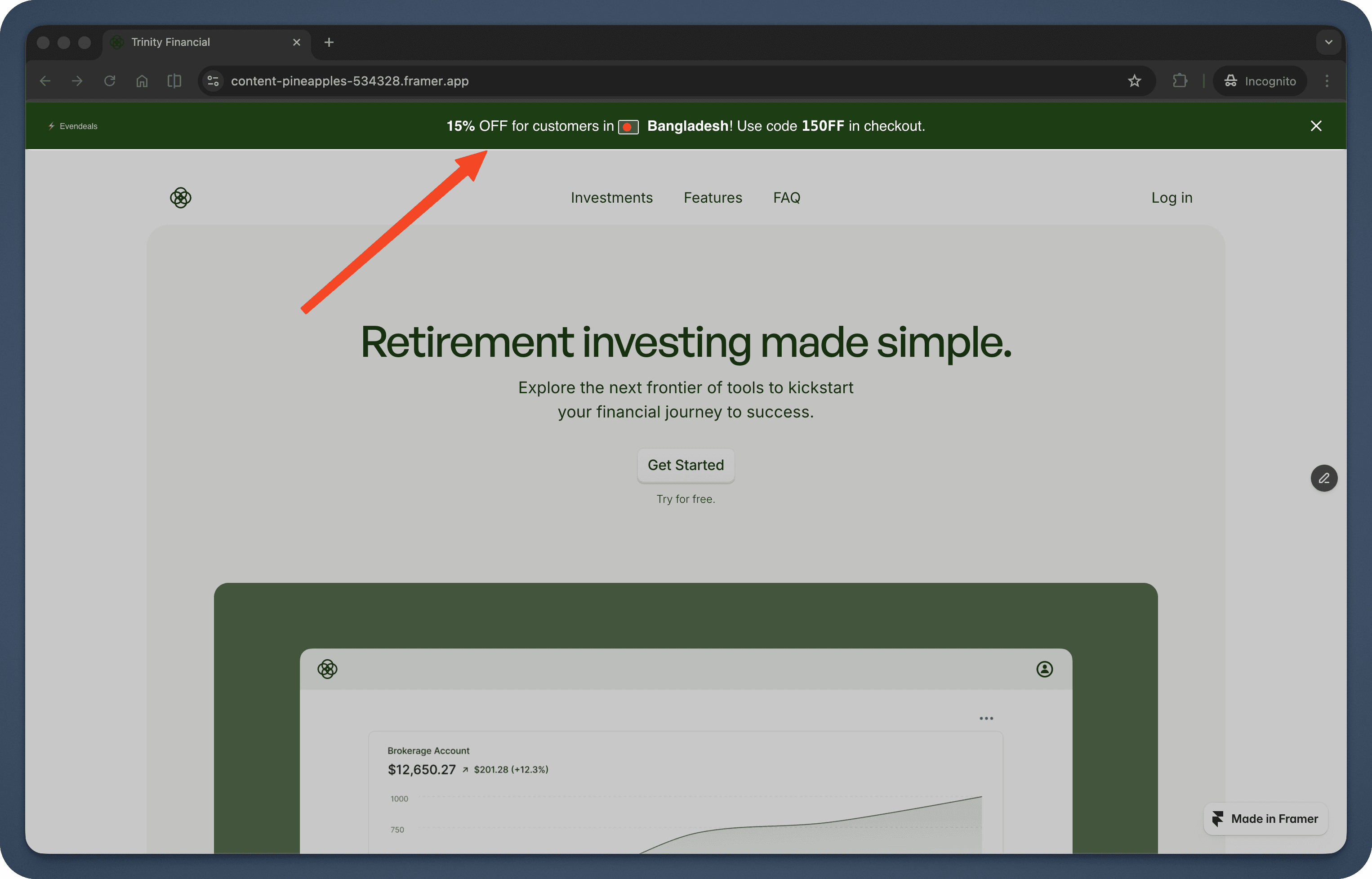
How It Works
When someone from India visits your Framer pricing page:
- They see a banner: "Special pricing for visitors in India - Get 40% off"
- They copy the coupon code
- They use the coupon code at checkout
- They pay the discounted price
Someone from the US sees your regular price - no banner, no discount.
Beyond the Banner: Display Modes
The default banner works great out of the box, but Evendeals supports three display modes:
- Banner (default): The floating banner you just set up. Customize colors, text, position, and countdown timers from the dashboard. Coupon code is click-to-copy.
- Custom Display: Turn off the banner and use CSS classes (
ed-country,ed-discount-amount,ed-coupon-code,ed-country-flag) to show discount data inside your own design. No JavaScript needed. - API Mode: Call the Evendeals API directly from your frontend or backend for full control. Great for custom checkout flows and server-rendered pricing.
VPN Protection
People using VPNs to fake their location and get cheaper prices is a real problem. Evendeals (paid plans) automatically detects and blocks VPN users, so only people who actually live in those countries get the discounts.
What You Can Customize
- Which countries see discounts
- How much discount each country gets
- Banner colors and text
- Whether the banner has a countdown timer
- Which pages show the banner (use Framer Custom Code page targeting or add multiple URLs in Evendeals)
Pricing
Evendeals: Free plan available, paid plans start at $99 one-time (not monthly)
The free plan lets you test it with basic features. If you make just 2 extra sales at $49 from countries that weren't converting before, you've covered the cost of the paid plan.
FAQ
What is PPP pricing for Framer?
Framer PPP pricing means showing different discount codes to visitors based on their country's purchasing power. Instead of one flat price for everyone, visitors from lower-income countries see a discounted price that reflects what that amount of money is actually worth locally. You configure the tiers once in Evendeals; geo-detection runs automatically on your Framer site.
How do I pick the right discount amount for each country?
A practical starting point: check how your price compares to local monthly incomes. If your product costs $99 and the average monthly income in a country is around $400, a 40-50% discount brings it into a more reasonable proportion. The table in Step 4 above gives you a solid framework. Start conservative at 15-20% and increase for regions that still are not converting.
Does Framer support PPP discounts natively?
No. Framer does not have built-in PPP or location-based pricing. Evendeals adds this by detecting the visitor's country and showing the right discount banner on top of your existing Framer pages. No changes to your Framer design are needed.
Will this slow down my Framer site?
No. The script is 5KB and loads asynchronously.
Can I show banners on specific Framer pages only?
Yes. In Evendeals you can target specific URLs. In Framer Custom Code you can also choose which pages the script runs on.
What if I have multiple products or pages?
You can create different deals and banners for different URLs, or reuse the same banner and coupon codes across multiple pages.
Do I need to know code?
No. It's copy-paste installation.
Next Steps
Also see: Thinkific, Teachable, Podia, EzyCourse, WordPress.
- Create your coupon codes in your payment provider for different regions
- Sign up at evendeals.com (free)
- Install the script in Framer Project Settings → Custom Code
- Watch your international conversion rates increase
Most site owners see results within the first week. Visitors from India, Brazil, Southeast Asia, and Latin America are hungry for quality offers - they just need pricing that makes sense for their economy.
Try Evendeals Free