
How to Add Purchasing Power Parity to Your Next.js App
A developer guide to implementing country-based pricing in Next.js, from simple script tags to full server-side API integration with Server Components.
For the general guide that works on any website, see Country-Based Pricing: The Ultimate Guide. Why this works: Why Your Online Business Needs Parity Pricing.
Why PPP for Next.js Apps
Your $99 SaaS plan or digital product might be reasonable in the US, but in countries like India, Brazil, or the Philippines, that price can represent 10-15% of someone's monthly income. You're not losing sales because your product isn't valuable - you're losing them because of purchasing power differences.
Purchasing power parity (PPP) pricing adjusts what you charge based on where the visitor is located. Next.js developers using this strategy typically see 20-30% increases in international revenue from the same traffic.
Because Next.js gives you full control over rendering (client, server, static), you have three distinct ways to implement PPP pricing with Evendeals.
Three Approaches
Next.js is unique among platforms because you have full code control. Here are three ways to add PPP pricing, from simplest to most customizable:
- Script Tag - Drop in the Evendeals banner script via
next/script. Easiest, no backend changes. - Custom Display Mode - Use CSS classes from the Evendeals script to build your own pricing UI instead of using the default banner.
- Server-Side API - Fetch PPP data in a Server Component or API route using the Evendeals API. Full control over rendering and logic.
Approach 1: Script Tag (Simplest)
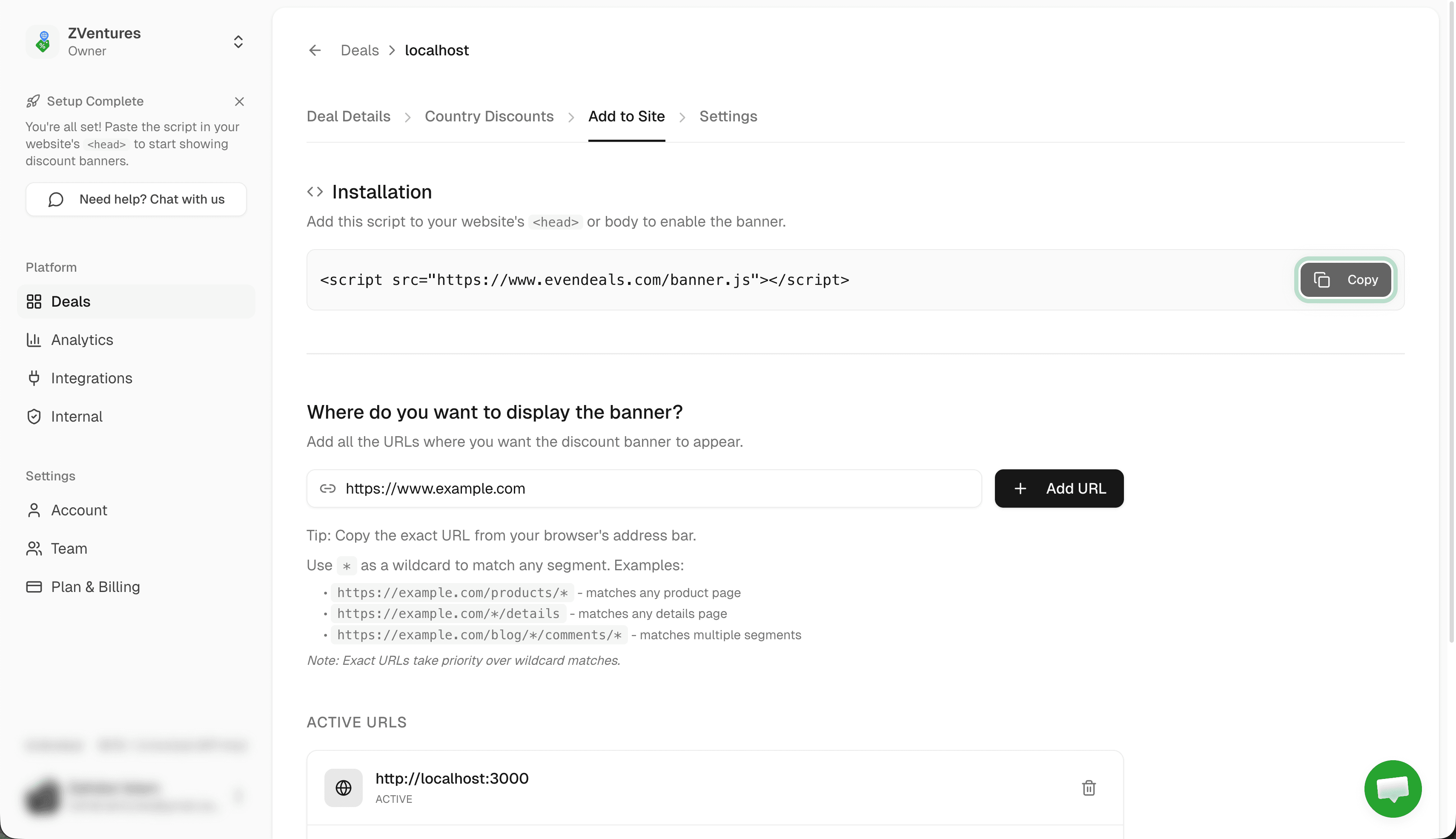
The fastest way to add PPP pricing. Import next/script and add the Evendeals banner script to your layout. The banner appears automatically for visitors from countries where you've configured discounts.
Add this to your layout.tsx (or any layout/page where you want the banner):
import Script from "next/script";

export default function RootLayout({
  children,
}: {
  children: React.ReactNode;
}) {
  return (
    <html lang="en">
      <body>
        {children}
        <Script
          src="https://www.evendeals.com/banner.js"
          strategy="afterInteractive"
        />
      </body>
    </html>
  );
}
That's it. The script is 5KB, loads asynchronously via afterInteractive, and won't block your page render. The banner automatically detects the visitor's country and shows the appropriate discount and coupon code. It also auto-detects client-side navigation (e.g. Next.js router transitions) and updates the banner on each page change.
This approach works with both the App Router and Pages Router. For Pages Router, add it to _app.tsx instead.
Approach 2: Custom Display Mode
If you want to build your own pricing UI instead of showing the default banner, use Custom Display Mode. The Evendeals script injects CSS classes into your page with discount data that you can use in your own components.
Available CSS classes:
.ed-discount-amount- The discount percentage (e.g. "30").ed-coupon-code- The coupon code (e.g. "SAVE30").ed-country-flag- The visitor's country flag.ed-country- The visitor's country name.ed-hidden- Added to elements when no discount is available, use it to hide your custom UI
You still include the script tag from Approach 1, but configure your deal to use Custom Display Mode in the Evendeals dashboard. Then style elements with these classes however you want in your React components.
For full details and examples, see the Custom Display Mode documentation.
Approach 3: Server-Side API
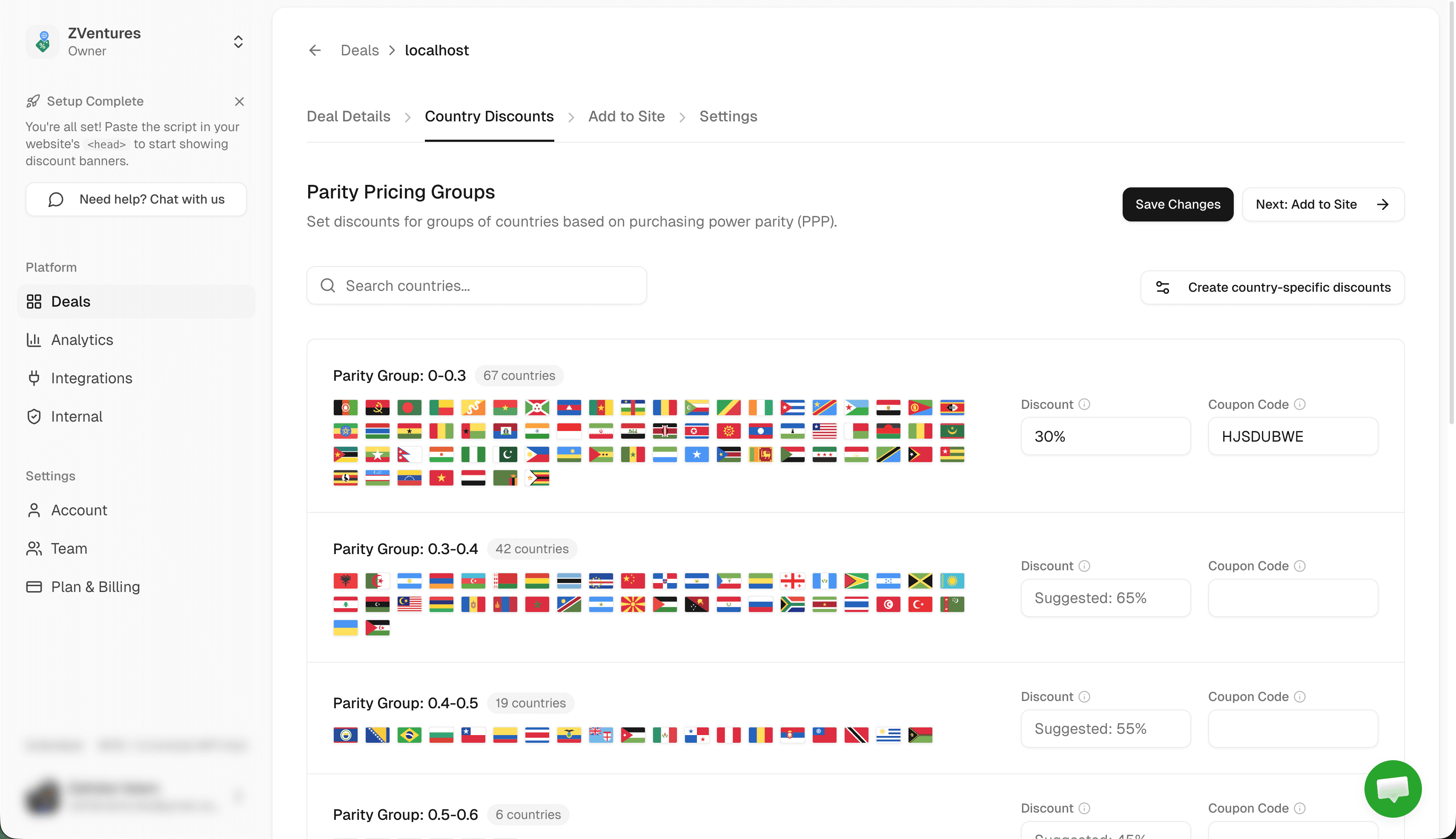
For maximum control, fetch PPP data on the server. This works in Server Components (App Router), getServerSideProps (Pages Router), or API routes. You get the discount data before the page renders and can use it to adjust prices, show custom UI, or apply coupons automatically.
The API endpoint format is: GET https://www.evendeals.com/api/discount?ip=VISITOR_IP&productId=YOUR_PRODUCT_ID
Here's an example Server Component that fetches PPP data and renders custom pricing:
import { headers } from "next/headers";

async function getPPPDiscount() {
  const headersList = await headers();
  const ip =
    headersList.get("x-forwarded-for")?.split(",")[0] ??
    headersList.get("x-real-ip");

  if (!ip) return null;

  const params = new URLSearchParams({
    ip,
    productId: process.env.EVENDEALS_PRODUCT_ID!,
  });

  const res = await fetch(
    `https://www.evendeals.com/api/discount?${params}`,
    {
      headers: { "x-api-key": process.env.EVENDEALS_API_KEY! },
      next: { revalidate: 0 },
    }
  );

  if (res.status !== 200) return null;

  const data = await res.json();
  if (data.isVpn && data.settings?.blockVpn) return null;
  return data.discount ?? null;
}

export default async function PricingPage() {
  const discount = await getPPPDiscount();
  const basePrice = 99;
  const finalPrice = discount
    ? basePrice * (1 - Number(discount.discountAmount) / 100)
    : basePrice;

  return (
    <div>
      <h1>Pricing</h1>
      {discount && (
        <p>
          Special pricing for {discount.countryName}:
          {discount.discountAmount}% off with code {discount.couponCode}
        </p>
      )}
      <p>Price: ${finalPrice}</p>
    </div>
  );
}
This gives you full control: adjust displayed prices, apply coupons at checkout, or conditionally render entire sections based on the visitor's country. The API key is required (Pro or Unlimited plan).
For the full API reference including response shape, error codes, and client-side usage, see the Purchasing Power Parity API docs.
How to Set Up Evendeals
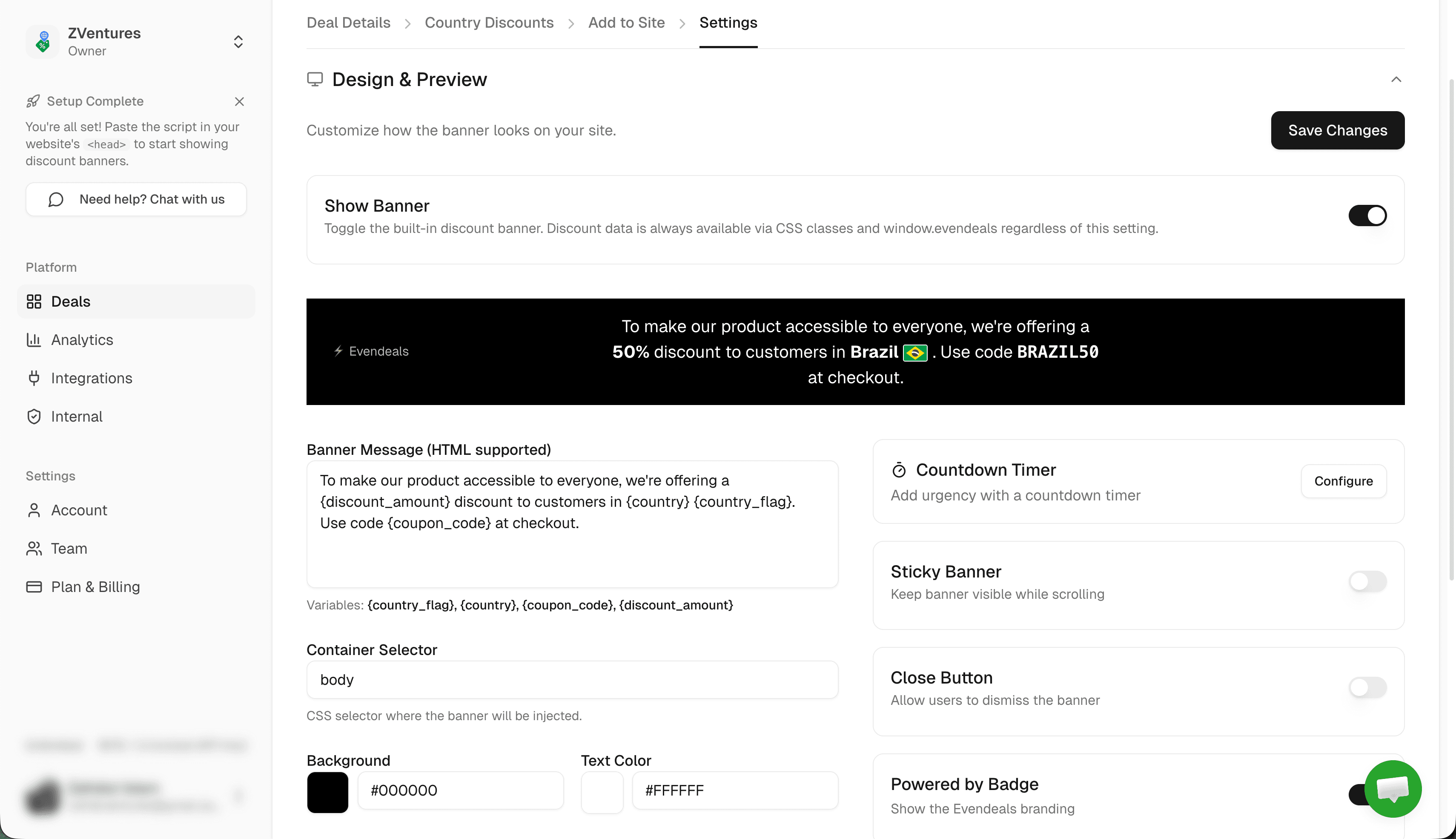
Whichever approach you choose, you need to configure your deal in Evendeals first:
- Create an account at evendeals.com (free plan available).
- Create a new deal and go to the Where to display tab. Add your Next.js app's URL (e.g.
https://yourapp.com/pricing). - Configure discounts in the Country Discounts tab. Set discount percentages and coupon codes for each country group. Create matching coupon codes in your payment provider (Stripe, Lemon Squeezy, Dodo Payments, Creem, Polar, WooCommerce, or FastSpring).
- Customize the banner (for Approach 1) in the Add to Site tab. Match colors to your app's theme.
- Copy the script or note your Product ID depending on which approach you're using.
VPN Protection
People using VPNs to fake their location and get cheaper prices is a real problem. Evendeals (paid plans) automatically detects and blocks VPN users, so only people who actually live in those countries get the discounts. In Approach 3 (API), you can also check data.isVpn and data.settings.blockVpn to handle VPN users in your own server logic.
Auto-Refresh Coupons (paid plans) automatically rotate coupon codes after a set number of views. If someone shares your code publicly, it expires and a new one is created. Requires a connected payment provider (Stripe, Lemon Squeezy, Dodo Payments, or Creem).
What You Can Customize
- Which countries see discounts
- How much discount each country gets
- Banner colors and text (Approach 1)
- Entirely custom UI using CSS classes (Approach 2) or raw API data (Approach 3)
- Whether the banner has a countdown timer
- Click-to-copy coupon codes
- Banner position (top or bottom)
- Which pages show discounts (target specific URLs or patterns like
https://yourapp.com/pricing/*)
FAQ
Can I use the App Router?
Yes. All three approaches work with the App Router. The script tag goes in layout.tsx, and the server-side API works in any Server Component.
Does it work with the Pages Router?
Yes. For the script tag, add it to _app.tsx. For server-side, use getServerSideProps to fetch PPP data and pass it as props.
SSR vs client-side - which should I use?
Use the script tag (client-side) if you want the simplest setup with zero backend changes. Use the server-side API if you need to adjust prices before the page renders, apply coupons automatically, or keep discount logic off the client.
Will this affect performance?
The script tag is 5KB and loads asynchronously via afterInteractive - it won't affect your Core Web Vitals. The server-side API adds one fetch call during SSR, which is typically under 100ms.
Can I use this with static generation (SSG)?
For SSG/ISR pages, use Approach 1 (script tag) since the page is pre-rendered and you can't access the visitor's IP at build time. The script handles everything client-side.
Next Steps
Also see: WordPress, Framer, Webflow, API Docs.
- Choose your approach: script tag for speed, custom display for branded UI, or server-side API for full control.
- Sign up at evendeals.com (free).
- Configure your country discounts and coupon codes.
- Add the script to your layout or integrate the API in your Server Component.
- Watch your international conversion rates increase.
Most developers get this running in under 10 minutes. Visitors from India, Brazil, Southeast Asia, and Latin America are eager to buy your product - they just need pricing that makes sense for their local economy.
Try Evendeals Free