
How to Add Regional Pricing to Your Stan Store Products
Losing sales from international customers because your digital products are too expensive in their country? Here's how to show location-based discounts for your Stan Store products.
For the general guide that works on any website, see Country-Based Pricing: The Ultimate Guide. Why this works: Why Your Online Business Needs Parity Pricing.
Why International Customers Aren't Buying
Your $97 digital product might be a no-brainer in the US, but in countries like India, Brazil, or Nigeria, that same price represents 10-15% of someone's monthly income. You're not losing sales because your product isn't valuable - you're losing them because of purchasing power differences.
The Approach: Landing Page + Stan Store
Stan Store has limited custom code options, so you can't add scripts directly to your Stan Store page. Instead, the approach is to use a simple landing page (built with Framer, Carrd, or any website builder) that shows the Evendeals discount banner, then links to your Stan Store checkout.
How it works:
- Create a landing page for your product
- Add the Evendeals script to show country-based discount banners
- The banner displays a coupon code visitors can use at your Stan Store checkout
- Link your "Buy Now" button to your Stan Store product URL
Alternative: If you use Stripe or another supported provider for payments through Stan Store, you can connect that account in Evendeals for automatic coupon sync. Coupons are created in your payment provider and available at checkout.
The Solution: Parity Pricing Banners
Instead of manually managing different pricing for different regions, you show smart discount banners based on where your visitors are located. When someone from Brazil visits your landing page, they see a 30% discount offer with a coupon code. Someone from the US sees your regular price.
This is called parity pricing (or purchasing power parity), and creators using this strategy report 20-30% increases in international sales.
How to Set It Up (Step by Step)
What you need:
- Your Stan Store product (with coupon support or a connected payment provider)
- A simple landing page (Framer, Carrd, WordPress, or any site builder)
- A free account at Evendeals.com
- 10 minutes
Step 1: Create a Landing Page
Since Stan Store doesn't support custom scripts, you need a landing page where the Evendeals banner can display. This page acts as your product's sales page and links to your Stan Store checkout.
- Use any website builder - Framer, WordPress, Carrd, or even a simple HTML page
- Add your product details, benefits, and a "Buy Now" button
- Point the "Buy Now" button to your Stan Store product URL
- Publish the page and copy its URL
Step 2: Set Up Evendeals
- Sign up at evendeals.com (free account available)
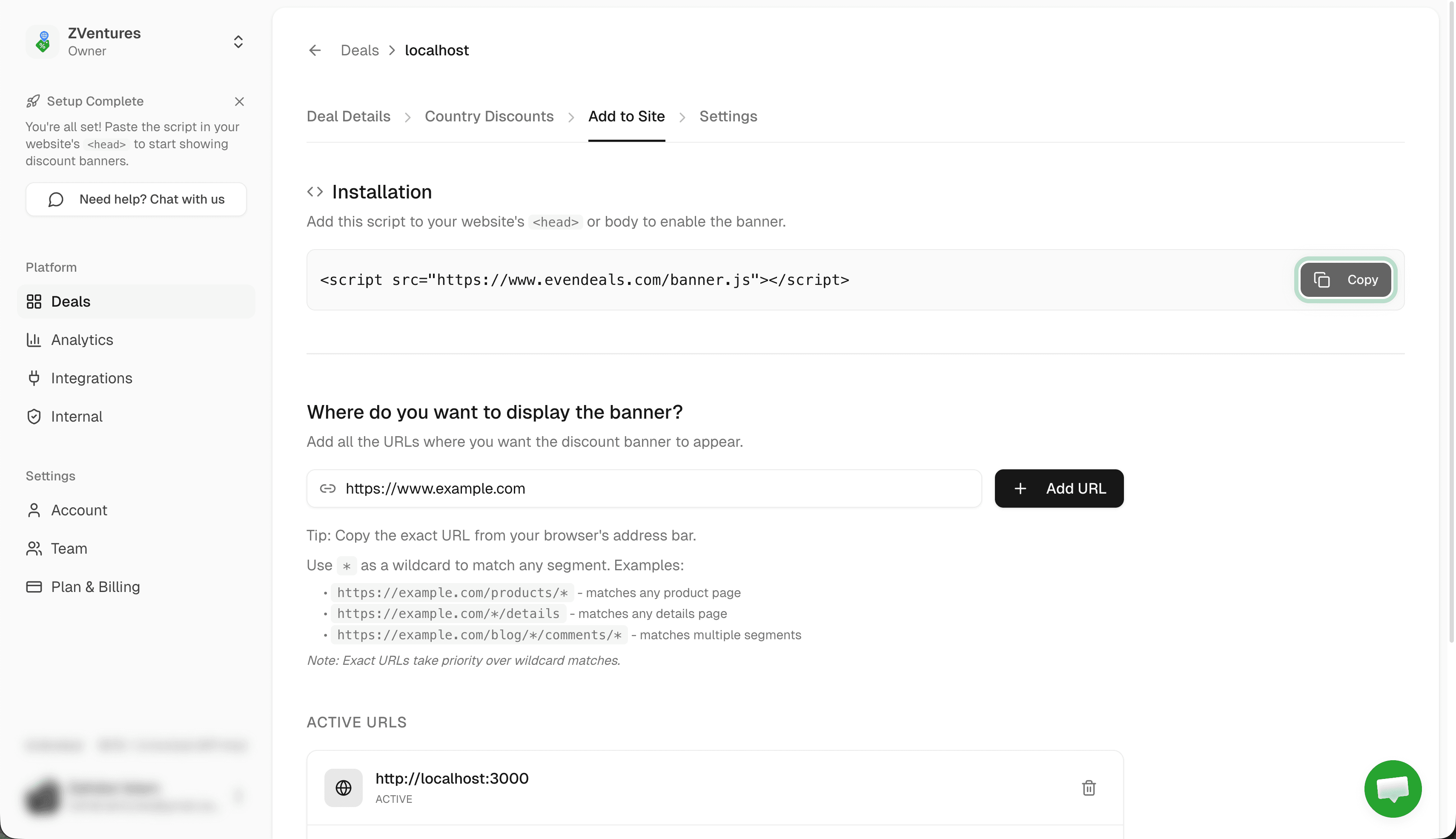
- Create a new deal and go to Where to display
- Paste your landing page URL (not your Stan Store URL)
- Click Add URL
Step 3: Create Coupons
Option A: Payment provider integration (recommended) — If your Stan Store uses Stripe, Lemon Squeezy, Dodo Payments, Creem, Polar, WooCommerce, or FastSpring, connect your account in Evendeals. Coupons are created automatically when you sync, and they work at your Stan Store checkout.
Option B: Manual setup — Create discount codes directly in Stan Store for different regions. You'll enter these same codes in Evendeals so the banner displays them to visitors.
- In Stan Store (or your payment provider), create coupon codes for different regions
- Example:
15OFF(15%),30OFF(30%),50OFF(50%) - Make sure the codes apply to the products you sell
Step 4: Configure Country Discounts in Evendeals
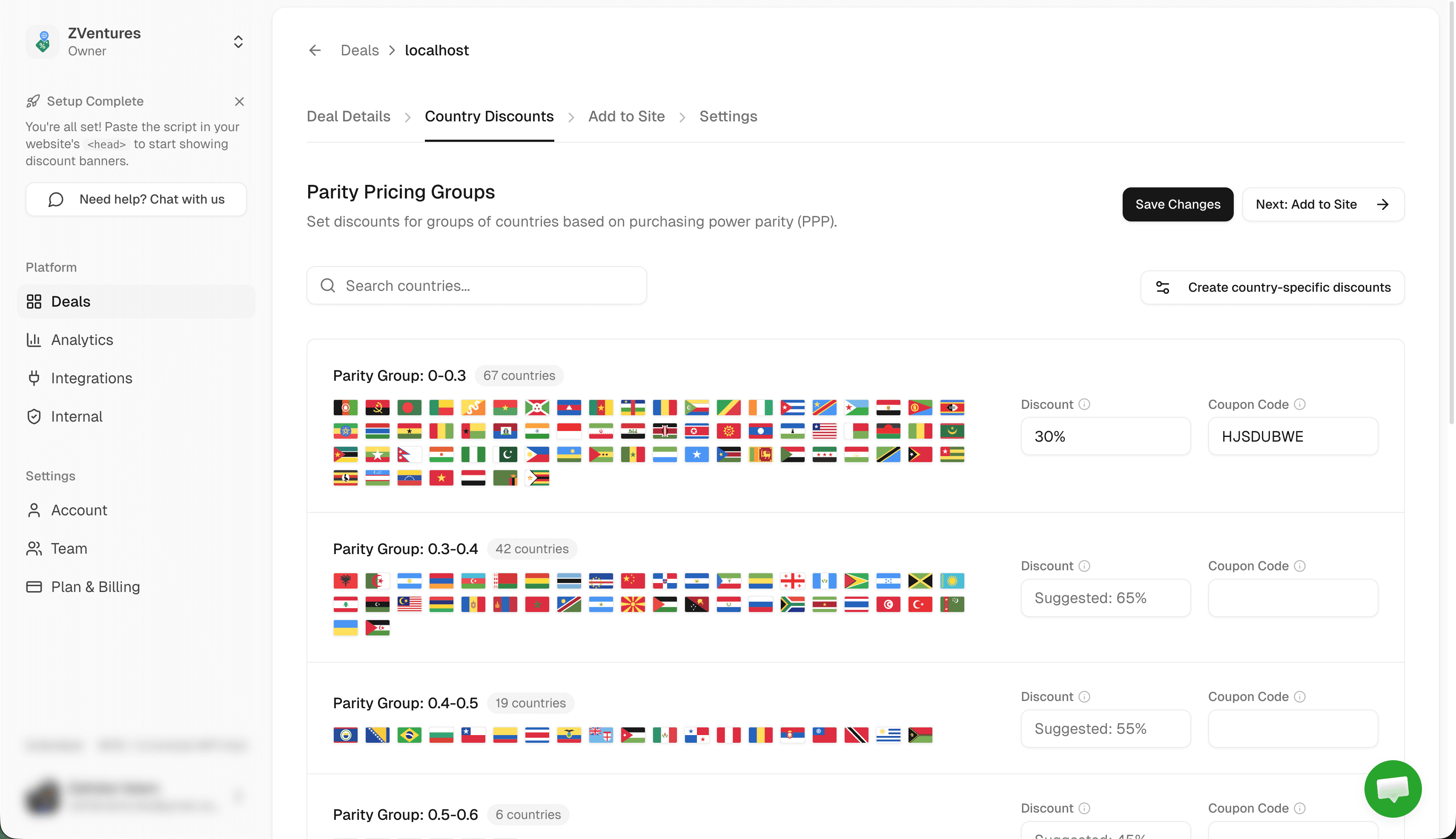
- Go to Country Discounts in Evendeals
- Set discount percentages and enter the coupon code for each country group (e.g., 15% with
15OFF, 50% with50OFF) - Click Save Changes
Note: The coupon codes in Evendeals must match exactly what you created in Stan Store or Stripe.
Step 5: Add the Script to Your Landing Page
- Go to Add to Site tab in Evendeals
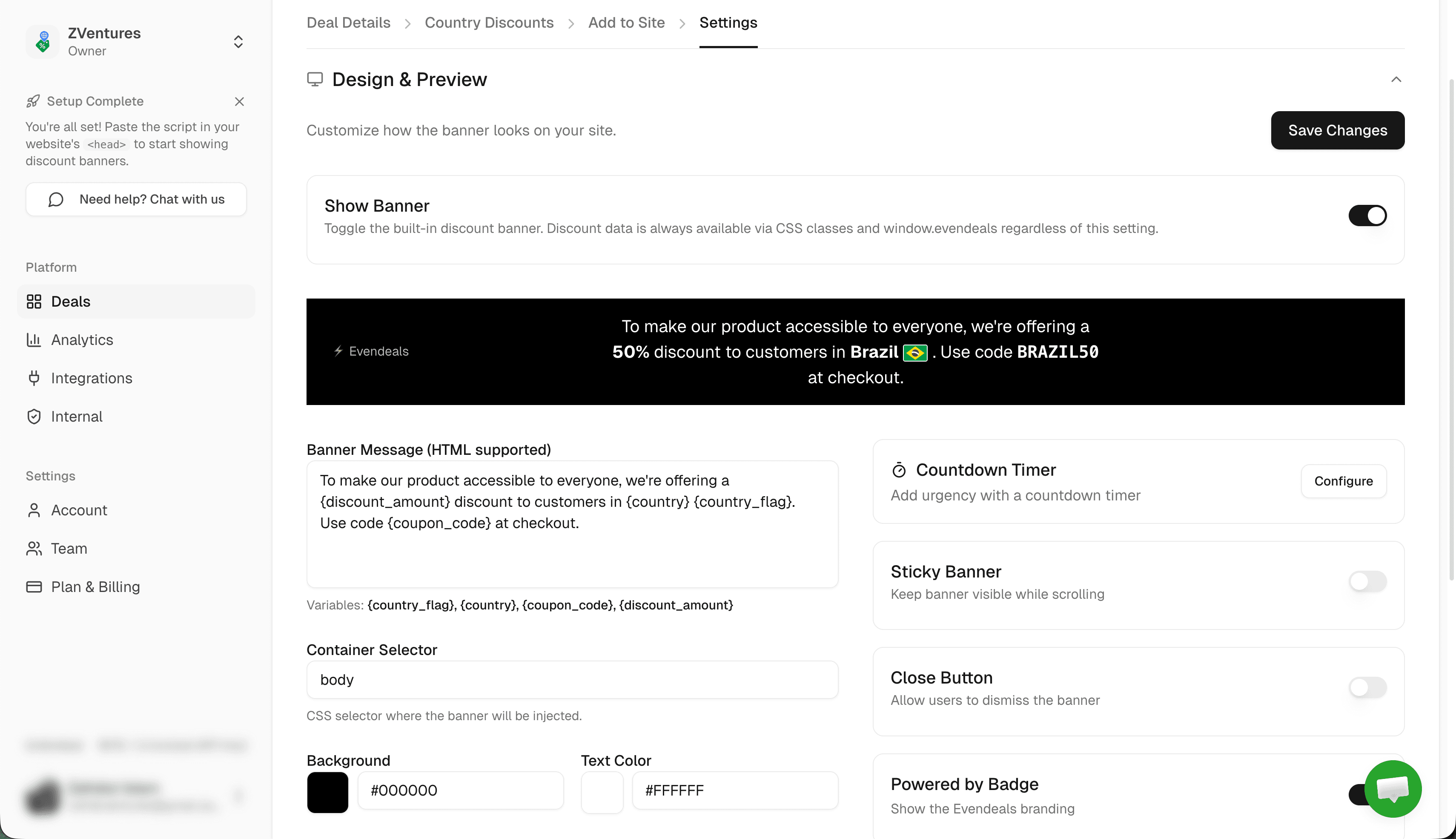
- Design your banner: customize colors, edit the message, preview how it looks
- Copy the installation script:
<script src="https://www.evendeals.com/banner.js"></script> - Paste it into your landing page's custom code section (location depends on your page builder)
Step 6: Link to Your Stan Store Checkout
- On your landing page, make sure the "Buy Now" or "Get It Now" button links to your Stan Store product URL
- When visitors see the discount banner, they copy the coupon code
- They click through to your Stan Store product and apply the coupon at checkout
- Publish your landing page - done!
How It Works
When someone from India visits your landing page:
- They see a banner: "Special pricing for visitors in India - Get 40% off"
- They copy the coupon code from the banner
- They click through to your Stan Store product
- They apply the coupon at checkout and pay the discounted price
Someone from the US sees your regular price - no banner, no discount.
Beyond the Banner: Display Modes
The default banner works great out of the box, but Evendeals supports three display modes:
- Banner (default) — The floating banner you just set up. Customize colors, text, position, and countdown timers from the dashboard. Coupon code is click-to-copy.
- Custom Display — Turn off the banner and use CSS classes (
ed-country,ed-discount-amount,ed-coupon-code,ed-country-flag) to show discount data inside your own design. No JavaScript needed. - API Mode — Call the Evendeals API directly from your frontend or backend for full control. Great for custom checkout flows and server-rendered pricing.
VPN Protection
People using VPNs to fake their location and get cheaper prices is a real problem. Evendeals (paid plans) automatically detects and blocks VPN users, so only people who actually live in those countries get the discounts.
Auto-Refresh Coupons (paid plans) automatically rotate coupon codes after a set number of views. If someone shares your code publicly, it expires and a new one is created.
What You Can Customize
- Which countries see discounts
- How much discount each country gets
- Banner colors and text
- Banner position (top or bottom)
- Click-to-copy coupon codes
- Whether the banner has a countdown timer
- Which landing pages show the banner
Pricing
Evendeals: Free plan available, paid plans start at $99 one-time (not monthly)
The free plan lets you test it with basic features. If you make just 2 extra sales at $49 from countries that weren't converting before, you've covered the cost of the paid plan.
FAQ
Can I add the script directly to Stan Store?
No. Stan Store doesn't support custom scripts. That's why you use a landing page with the Evendeals banner that links to your Stan Store checkout.
Will this slow down my landing page?
No. The script is 5KB and loads asynchronously.
What if I use Stripe with Stan Store?
Even better. Connect Stripe to Evendeals for automatic coupon creation. The coupons sync directly and work at Stan Store checkout since Stan Store uses Stripe under the hood.
What if I have multiple products?
You can create different deals and banners for different landing pages, or reuse the same banner and coupon codes across multiple pages.
Do I need to know code?
No. It's copy-paste installation on your landing page.
Next Steps
Also see: Framer, Thinkific, Teachable, Podia, WordPress.
- Create a simple landing page for your Stan Store product
- Sign up at evendeals.com (free)
- Create coupon codes (or connect Stripe for auto-sync)
- Install the Evendeals script on your landing page
- Watch your international conversion rates increase
Most creators see results within the first week. Visitors from India, Brazil, Southeast Asia, and Latin America are hungry for quality digital products - they just need pricing that makes sense for their economy.
Try Evendeals Free