
How to Add Regional Pricing to Your Gumroad Products
Losing international Gumroad sales? Here's how to add Purchasing Power Parity (PPP) discounts and show location-based pricing on your sales page in 5 minutes.
For the general guide that works on any website, see Country-Based Pricing: The Ultimate Guide. Why this works: Why Your Online Business Needs Parity Pricing.
Why International Visitors Are Not Buying
Your $29 ebook or $99 course might be completely affordable in the US, but in countries like India, Brazil, or the Philippines, that same price can represent 10-15% of someone's monthly income. You're not losing sales because your product lacks value. You are losing them because of purchasing power differences.
Gumroad is popular worldwide, which means your products are already visible to a global audience. The problem is that most Gumroad creators set a single USD price and never consider what that price means in other economies. A visitor from Indonesia sees your $49 digital product and leaves without buying, not because they do not want it, but because $49 is genuinely unaffordable at local purchasing power.
How Country-Based Pricing Works with Gumroad
Gumroad supports discount/offer codes that apply percentage discounts at checkout. The approach with Evendeals is:
- You create discount codes in Gumroad for different discount levels (for example, 20%, 40%, 60%)
- Evendeals detects where each visitor is from and shows a banner with the appropriate discount code
- The visitor copies the code and applies it at your Gumroad checkout
- They pay the localized price
Important: Gumroad does not allow custom scripts on Gumroad-hosted product pages (gumroad.com/l/yourproduct). The Evendeals script goes on your own sales page or landing page that links to your Gumroad product. This is how most serious Gumroad creators operate: they drive traffic to a custom sales page, then send buyers to Gumroad to complete the purchase.
If you use the Gumroad overlay widget (the embed that opens a checkout popup), the discount banner appears on your page and buyers enter the code in the overlay at checkout.
How to Set It Up (5 minutes)
What you need:
- A Gumroad account with at least one product
- Your own sales page or landing page (WordPress, Webflow, Framer, Squarespace, Carrd, or any site where you can add a script)
- A free account at Evendeals.com
Step 1: Create Discount Codes in Gumroad
- Log into your Gumroad dashboard
- Go to Products and open the product you want to add regional pricing to
- Click Edit and scroll to Offer codes (also called Discount codes)
- Create codes for each discount tier you want to offer. Example:
PPP20for a 20% discount (Eastern Europe, parts of Southeast Asia)PPP40for a 40% discount (India, Indonesia, Philippines)PPP60for a 60% discount (lower-income economies)
- Set each code to apply to all products or just the specific product
- Save your changes
Tip: Use the Regional Pricing Calculator to find appropriate discount percentages for each country based on real purchasing power data.
Step 2: Set Up Evendeals
- Sign up at evendeals.com (free account available)
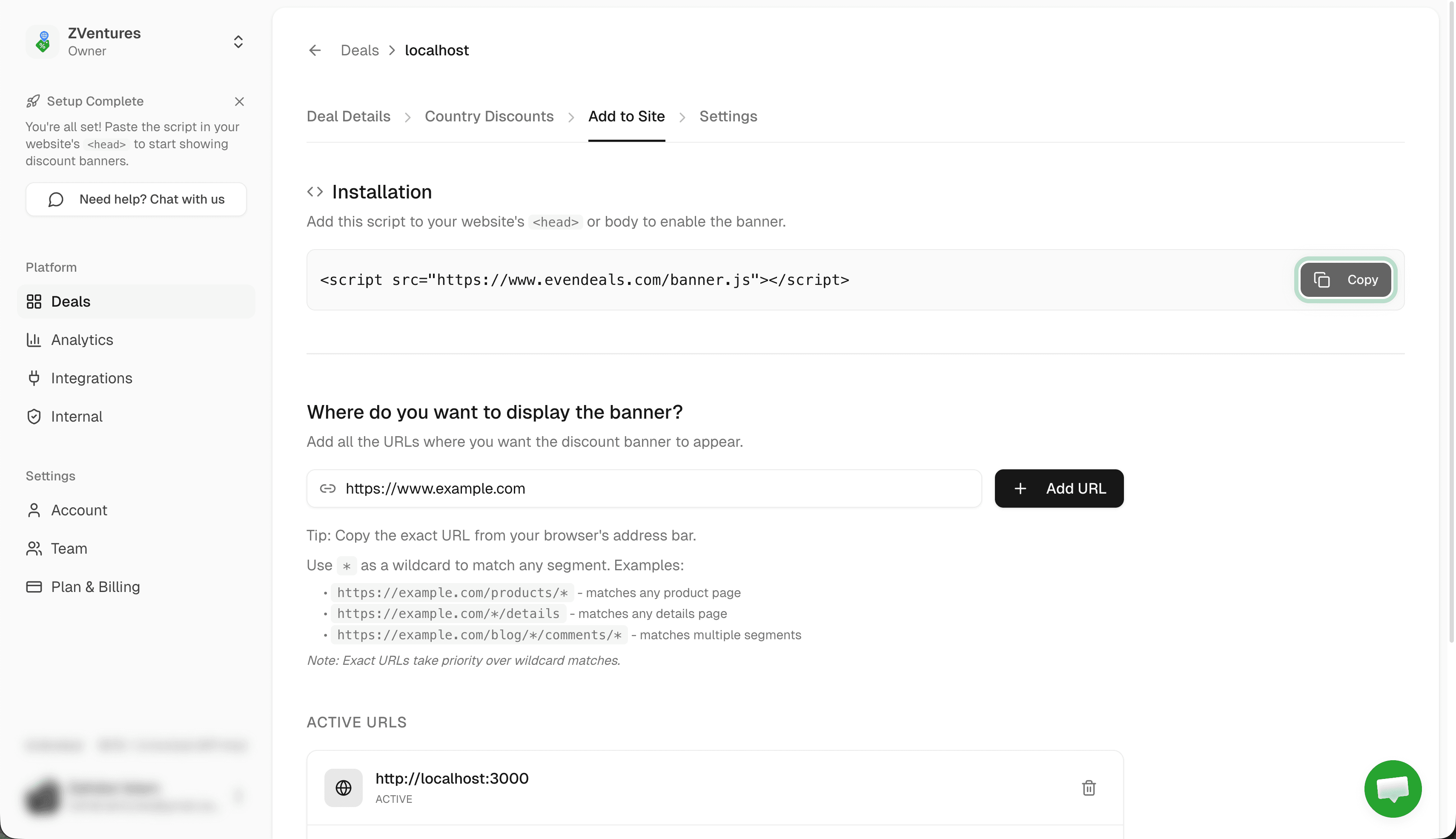
- Create a new deal and go to Where to display
- Paste the URL of your sales page (the page on your own site that promotes your Gumroad product)
- Click Add URL
Step 3: Configure Country Discounts in Evendeals
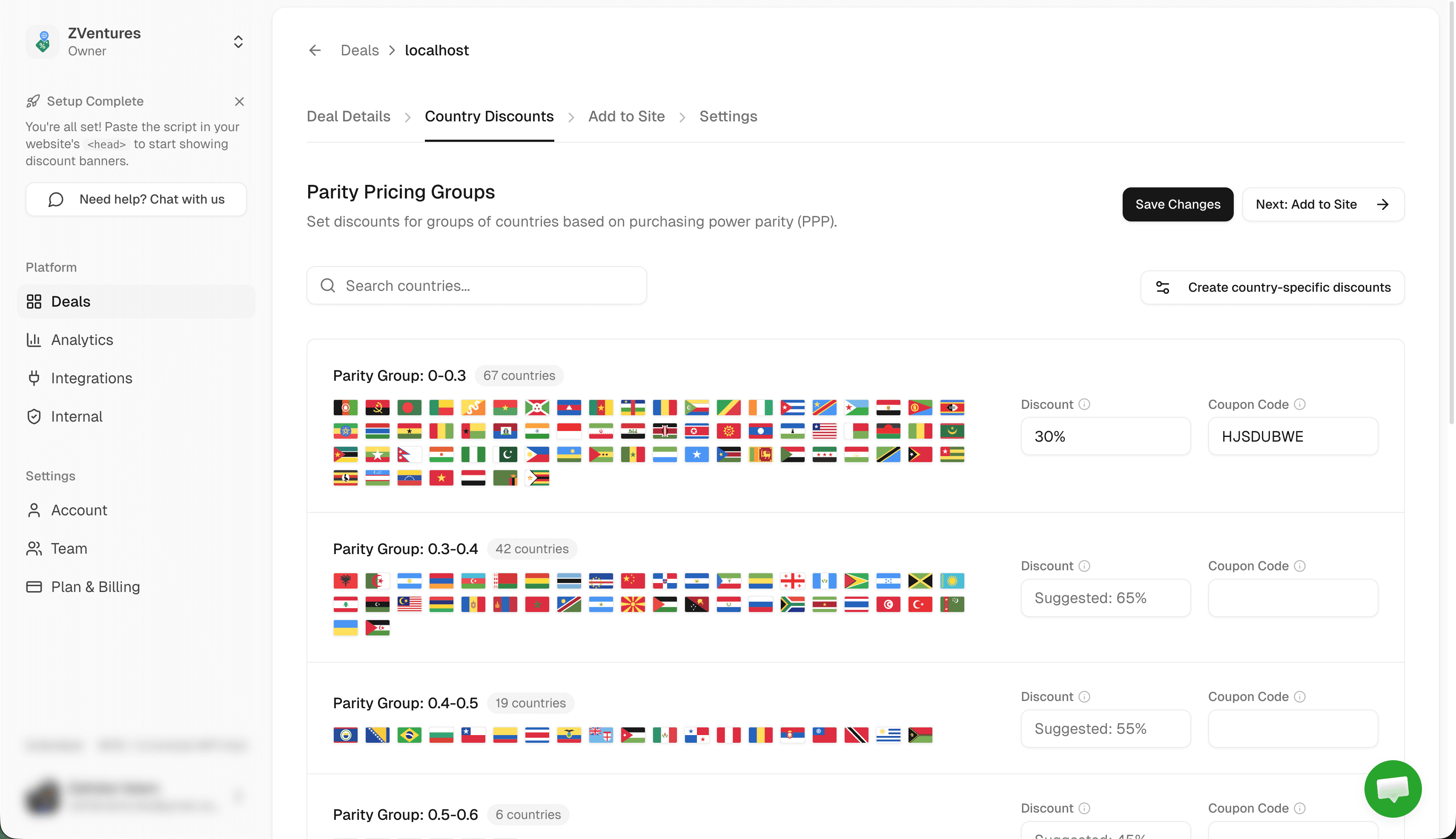
- Go to Country Discounts in Evendeals
- Set discount percentages and enter the matching Gumroad offer code for each country group
- Example: 40% discount with code
PPP40for India, Bangladesh, Pakistan, and similar economies - Click Save Changes
The offer codes in Evendeals must match exactly what you created in Gumroad. Evendeals displays the code to the visitor; the visitor types or pastes it at Gumroad checkout.
Step 4: Customize Your Banner
- Go to the Add to Site tab in Evendeals
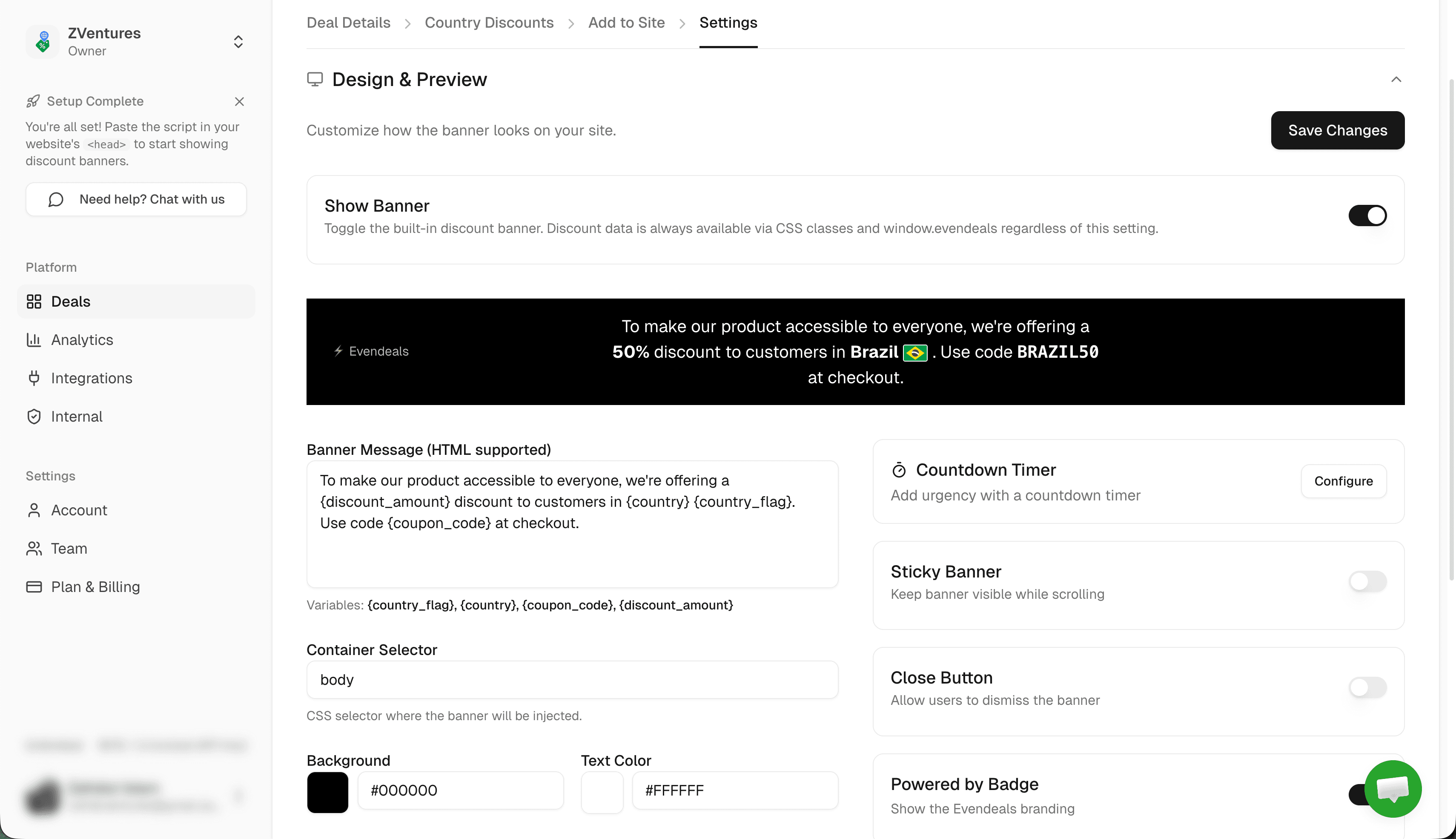
- Design your banner: customize colors to match your sales page, edit the message text, set position (top or bottom)
- Preview how it looks for a visitor from India or Brazil
- Copy the installation script
Step 5: Add the Script to Your Sales Page
Add the Evendeals script to your sales page. Where exactly depends on which platform you use:
- WordPress: See the WordPress guide for plugin installation
- Webflow: See the Webflow guide
- Framer: See the Framer guide
- Squarespace: See the Squarespace guide
- Carrd: See the Carrd guide
- Any other site: Paste the script before the
</body>tag in your HTML
Done! Visitors to your sales page from countries with regional pricing will now see a banner with their specific discount code.
How It Works for Customers
When someone from India visits your Gumroad sales page:
- They see a banner: "Special pricing for visitors in India: Get 40% off with code PPP40"
- They click the code to copy it
- They click your Gumroad buy button or link
- At Gumroad checkout, they paste the offer code
- They pay the localized price
Someone from the US sees your regular price with no banner.
Beyond the Banner: Display Modes
The default banner works great out of the box, but Evendeals supports three display modes:
- Banner (default) — The floating banner you just set up. Customize colors, text, position, and countdown timers from the dashboard. Coupon code is click-to-copy.
- Custom Display — Use CSS classes (
ed-country,ed-discount-amount,ed-coupon-code) to show discount data inside your own design with no banner overlay. - API Mode — Call the Evendeals API from your frontend or backend for full control over how pricing is displayed.
VPN Protection
Some visitors use VPNs to fake their location and access cheaper regional prices. Evendeals (paid plans) automatically detects and blocks VPN users, so only people who actually live in those countries receive the regional discount.
Auto-Refresh Coupons (paid plans) automatically rotate Gumroad offer codes after a set number of views, preventing code sharing on deal sites.
What You Can Customize
- Which countries see discounts
- How much discount each country gets
- Which Gumroad offer code each country receives
- Banner colors, text, and position
- Whether the code is click-to-copy
- Whether the banner has a countdown timer
- Which URLs on your site show the banner
Pricing
Evendeals: Free plan available. Paid plans start at $99 one-time (not monthly).
The free plan lets you test with basic features. If you make just two extra Gumroad sales from countries that were not converting before, the paid plan pays for itself.
FAQ
Can I use this directly on my Gumroad product page (gumroad.com/l/...)?
No. Gumroad does not allow custom script injection on their hosted product pages. The Evendeals script goes on your own sales page or landing page that drives traffic to your Gumroad product.
What if I do not have a separate sales page?
You can create one for free with tools like Carrd, Framer, or even a simple GitHub Pages site. Many Gumroad creators build a dedicated sales page specifically to add custom scripts and SEO content that Gumroad itself does not support.
Do the Gumroad offer codes expire?
By default, offer codes you create in Gumroad do not expire unless you set an expiry date. Set them to not expire so the regional pricing remains available indefinitely.
Will this slow down my page?
No. The Evendeals script is 5KB and loads asynchronously.
What if I have multiple Gumroad products?
Create separate deals in Evendeals for each product page, with the appropriate offer codes for each product. Or create universal offer codes in Gumroad that apply across all your products.
Next Steps
Also see: Shopify, Squarespace, WordPress, Framer, Carrd, Stan Store, Webflow.
- Create offer codes in Gumroad for each discount tier you want
- Sign up at evendeals.com (free)
- Configure country discounts with your Gumroad offer codes
- Install the script on your sales page
- Watch your international conversion rates increase
Visitors from India, Brazil, Southeast Asia, and Latin America are already finding your Gumroad products. Give them pricing that reflects what those currencies can actually buy, and you will see them convert.
Try Evendeals Free