
How to Add Regional Pricing to Your Divi Site
Losing international Divi sales? Here's how to add Purchasing Power Parity (PPP) discounts and show location-based pricing to visitors in 5 minutes.
For the general guide that works on any website, see Country-Based Pricing: The Ultimate Guide. For the broader WordPress guide, see How to Add Regional Pricing to Your WordPress Site.
Why International Visitors Are Not Buying
Your Divi sales page looks great. The copy is tight. The design converts well for US visitors. But your analytics show traffic from India, Brazil, and Southeast Asia with near-zero conversions. The problem is not your page. It is your price.
A $99 product costs an American about 2% of their monthly salary. The same price costs an Indian buyer closer to 25% of theirs. That gap does not close with better headlines or a longer guarantee. It closes with a lower price, and purchasing power parity (PPP) pricing is how you offer that lower price only to the people who need it, automatically, without touching your US revenue.
The Divi Advantage: WordPress + WooCommerce
Because Divi runs on WordPress, you get two install options that standalone platforms like Shopify or Gumroad do not offer:
- Evendeals WordPress plugin — one-click install, zero code. Injects the script site-wide without touching any Divi template. See the WordPress plugin page.
- WooCommerce auto-sync — if your Divi site uses WooCommerce, Evendeals auto-creates and syncs coupon codes inside WooCommerce. No manual coupon setup needed.
How to Set It Up (Under 5 Minutes)
What you need:
- A WordPress site using the Divi theme or Divi Builder plugin
- A free account at Evendeals.com
- 5 minutes
Step 1: Install Evendeals
Pick whichever method fits your workflow:
Method A: WordPress plugin (recommended)
- In WordPress admin, go to Plugins > Add New
- Search for Evendeals and install the free plugin
- Activate and connect your Evendeals account
- Done. Script is active site-wide.
Method B: Divi Code module
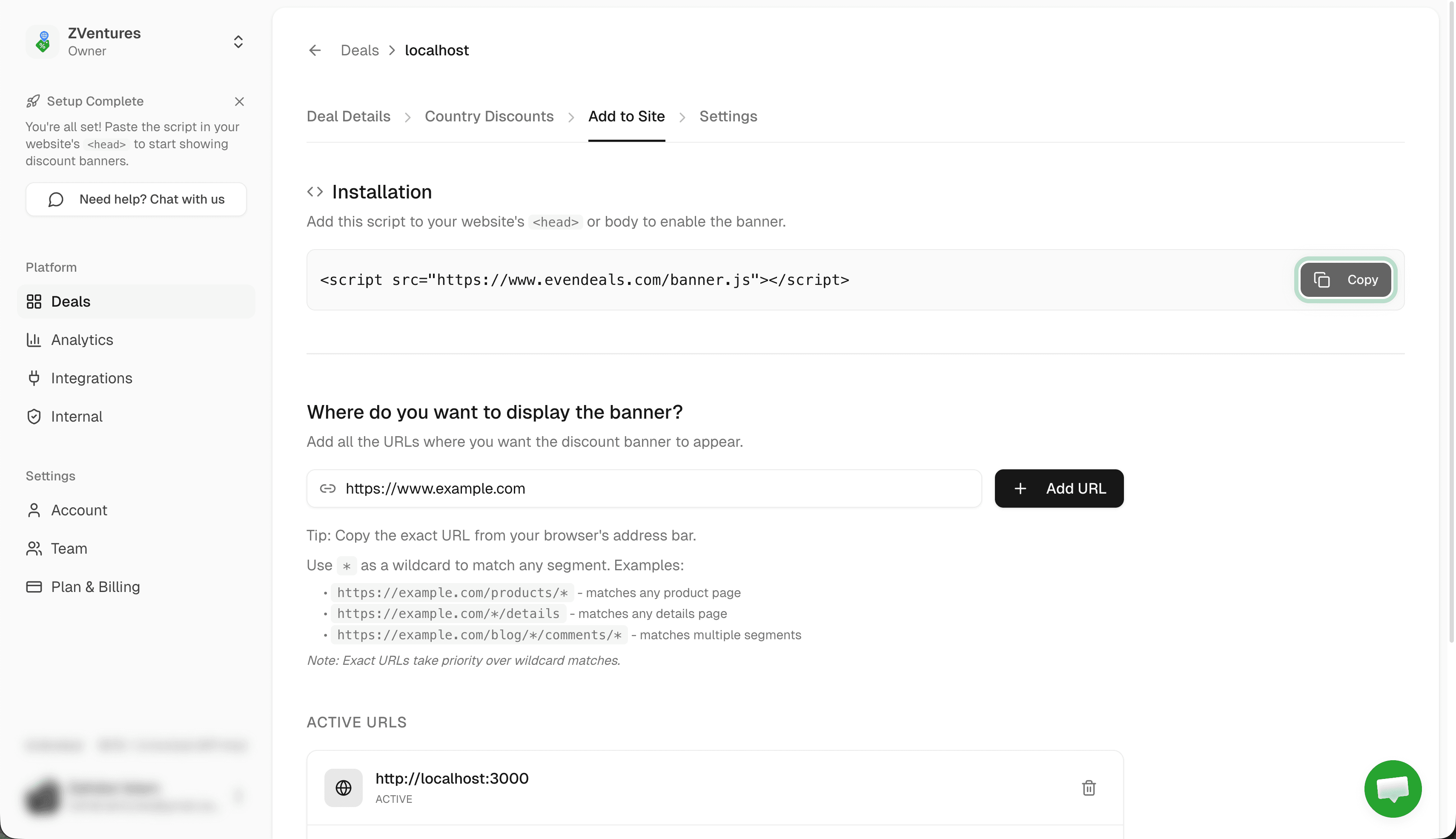
- Sign up at evendeals.com and copy your script from the Add to Site tab
- Open your page in the Divi Builder
- Add a new row and insert a Code module
- Paste the Evendeals script inside the Code module and save
- The module renders invisible to visitors but the script runs on page load
Method C: Divi Theme Options
- In WordPress admin, go to Divi > Theme Options
- Click the Integration tab
- In the Body Tracking Code field, paste the Evendeals script
- Click Save Changes
Method C is the cleanest site-wide option if you are not using the WordPress plugin, since it injects the script into every page without touching individual templates.
Step 2: Set Up Coupon Codes
Option A: Auto-sync (recommended) — connect your payment provider and Evendeals handles coupon creation automatically:
- WooCommerce — auto-creates and rotates coupon codes inside your WooCommerce store
- Stripe — auto-creates promotion codes via Stripe Connect
- Lemon Squeezy — auto-syncs discount codes via API key
Option B: Manual setup — create coupon codes in your payment provider and enter them in Evendeals. Works with any checkout that supports coupon codes.
- Create percentage discount codes for each regional tier. Example:
PPP20(20%),PPP40(40%),PPP60(60%) - Use the Regional Pricing Calculator to find fair discount percentages per country
Step 3: Configure Country Discounts in Evendeals
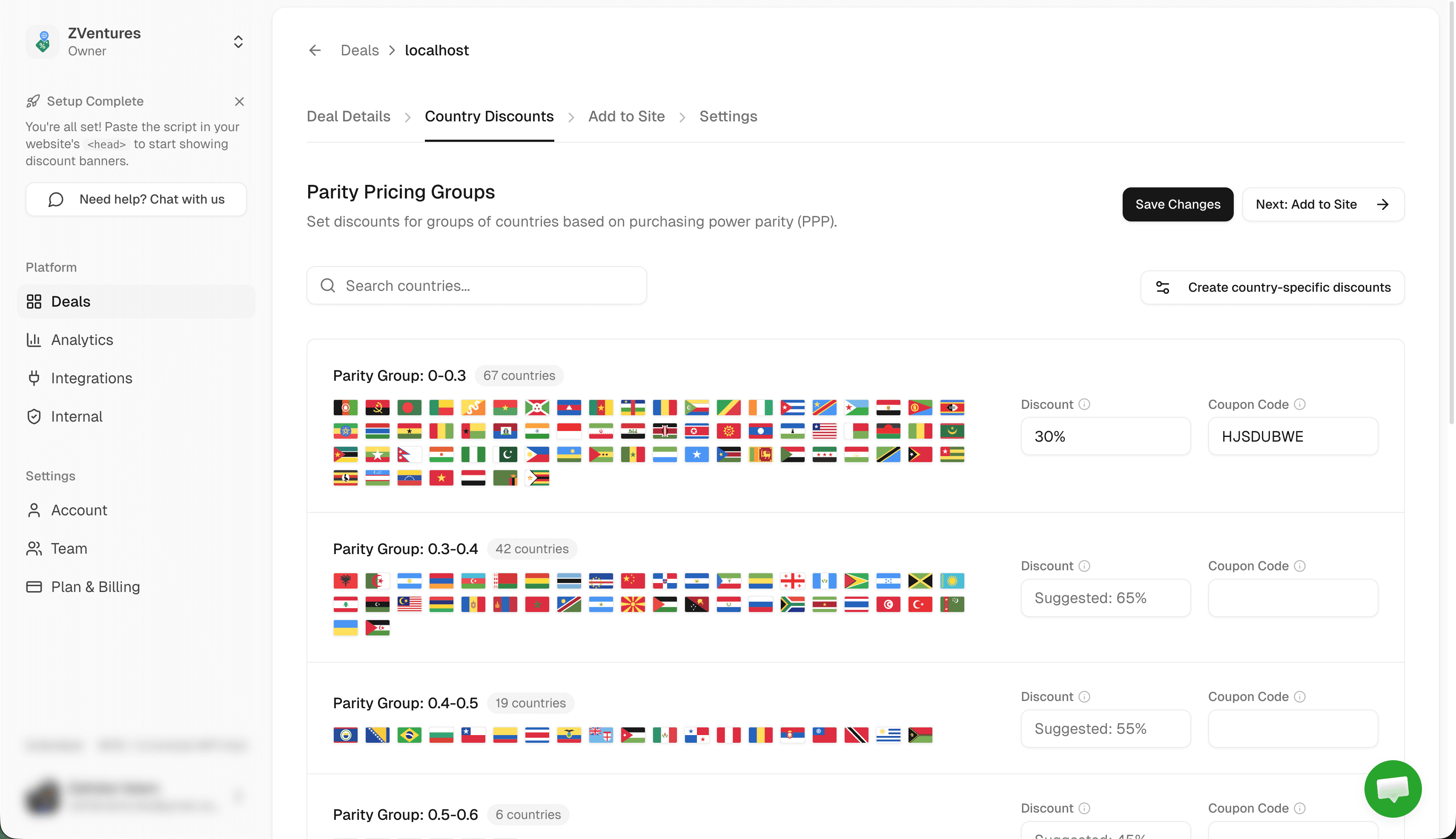
- Go to Country Discounts in your Evendeals dashboard
- Set the discount percentage and coupon code for each country group
- Click Save Changes
Step 4: Customize Your Banner
- Go to the Add to Site tab in Evendeals
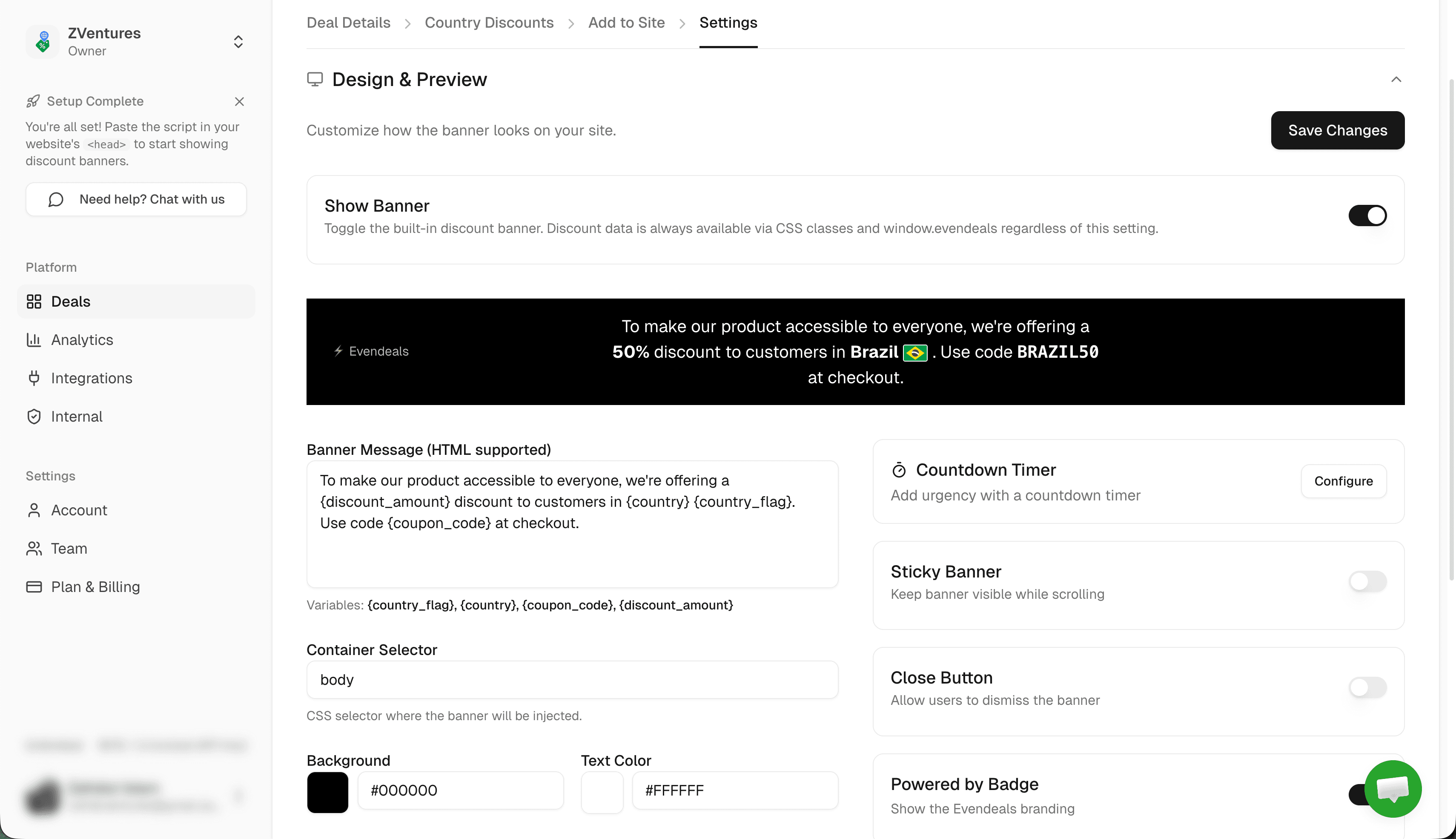
- Match the banner colors to your Divi theme, edit the message text, choose top or bottom position
- Preview the banner for different countries
How It Works
When someone from Brazil visits your Divi sales page:
- They see a banner: "Special pricing for visitors in Brazil: Get 35% off with code PPP35"
- They click the code to copy it
- They proceed to your WooCommerce or payment provider checkout and paste the code
- They pay the localized price
US visitors see your regular price. The banner does not appear for them.
Beyond the Banner: Display Modes
- Banner (default) — Floating bar with click-to-copy coupon. Customize colors, text, position, and countdown timer from the dashboard.
- Custom Display — Use Divi's CSS classes alongside Evendeals CSS class hooks (
ed-discount-amount,ed-coupon-code) to show regional pricing inside your own Divi section design. - API Mode — Server-side or client-side API calls. Useful if you want to render localized prices in Divi Dynamic Content fields.
VPN Protection
Evendeals (paid plans) detects and blocks VPN, proxy, and Tor connections automatically. Only genuine visitors from each country see the regional discount. Auto-rotating coupon codes prevent sharing on deal sites.
FAQ
Which Divi products does this work with?
All of them: the Divi theme, the Divi Builder plugin (standalone), and Divi with Divi Cloud. All three run on WordPress, so all three support the WordPress plugin and the Code module method.
Will this work with WooCommerce on my Divi site?
Yes, and WooCommerce is the best setup for Divi sites. Evendeals auto-creates and manages WooCommerce coupon codes so buyers do not need to manually enter anything at checkout if you configure it for auto-apply. See the WooCommerce integration.
Will this affect my Divi page speed?
No. The Evendeals script is 5KB and loads asynchronously after the page renders. It does not block rendering or affect your Core Web Vitals scores.
Can I use this with Divi Leads (A/B testing)?
Yes. Evendeals is a separate script that runs independently of Divi Leads. Both can be active on the same page without conflicts.
Do I need a child theme?
No. The WordPress plugin and the Theme Options method both work without a child theme. If you prefer editing theme files directly, adding the script to a child theme footer template also works, but it is the most complex option of the three.
Next Steps
Also see: Elementor, WordPress, Webflow, Squarespace, Shopify, Framer.
- Install the Evendeals WordPress plugin (or use Divi Theme Options / Code module)
- Connect WooCommerce or your payment provider for auto-coupon sync
- Configure country discounts in Evendeals
- Customize the banner to match your Divi theme colors
- Watch your international conversion rates increase
Visitors from India, Brazil, Southeast Asia, and Latin America are already browsing your Divi site. Give them prices that reflect what their currency can actually buy, and you will start converting them.
Try Evendeals Free