
How to Add Regional Pricing to Your Shopify Store
Losing international Shopify sales? Here's how to add Purchasing Power Parity (PPP) discounts and show location-based pricing to your store visitors in 5 minutes.
For the general guide that works on any website, see Country-Based Pricing: The Ultimate Guide. Why this works: Why Your Online Business Needs Parity Pricing.
Why International Shoppers Are Not Buying
Your Shopify analytics show traffic from India, Brazil, Mexico, and Southeast Asia, but those visitors convert at a fraction of your US rate. The most common reason is price. Your $49 product costs less than an hour of US wages, but the same amount represents several days of take-home pay in many countries.
This is the core problem that purchasing power parity (PPP) pricing solves. Companies like Netflix, Spotify, and Adobe already price by region. You can do the same on your Shopify store in minutes, without rebuilding your entire pricing structure.
How Country-Based Pricing Works on Shopify
Evendeals adds a smart discount banner to your Shopify storefront. When a visitor from Brazil lands on your store, they see a banner saying something like: "Special pricing for visitors in Brazil: Get 35% off with code PPP35." They copy the code and apply it at Shopify checkout.
The setup has two parts: discount codes in Shopify, and the Evendeals script in your theme.
How to Set It Up (5 minutes)
What you need:
- A Shopify store (any plan)
- Access to your Shopify theme code (Online Store access)
- A free account at Evendeals.com
Step 1: Set Up Evendeals
- Sign up at evendeals.com (free account available)
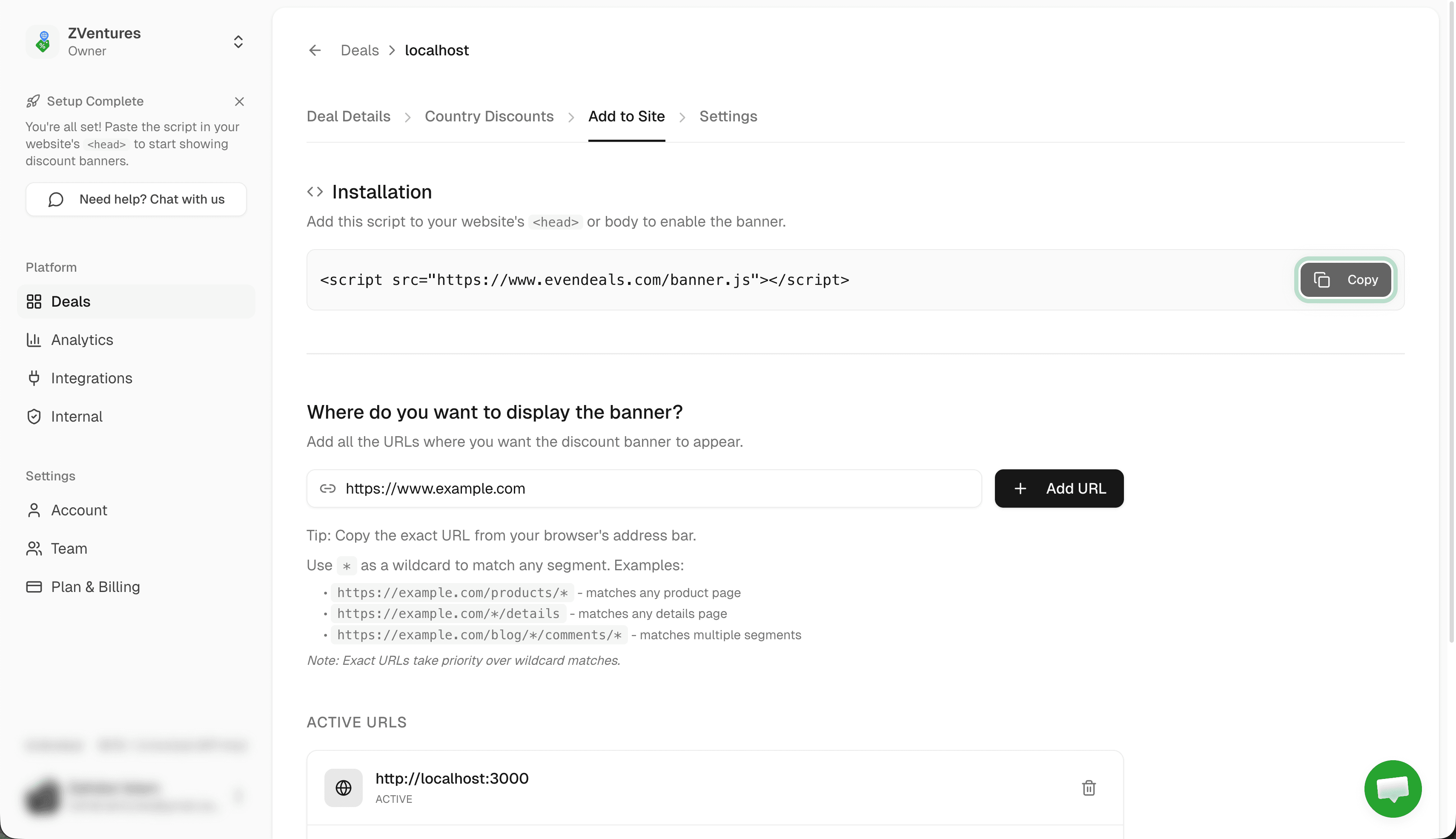
- Create a new deal and go to Where to display
- Paste your Shopify store URL (e.g.,
https://yourstore.myshopify.comor your custom domain) - Click Add URL to target your entire store, or add specific product or collection URLs
Step 2: Create Discount Codes in Shopify
- In your Shopify admin, go to Discounts in the left sidebar
- Click Create discount and choose Discount code
- Select Percentage discount type
- Create codes for each discount tier. Example:
PPP20for 20% off (Eastern Europe, parts of Latin America)PPP35for 35% off (Southeast Asia, parts of the Middle East)PPP50for 50% off (India, Pakistan, Bangladesh, Africa)
- Set minimum requirements if needed, then save each discount
Tip: Use the Regional Pricing Calculator to find appropriate discount percentages for each country based on real purchasing power data.
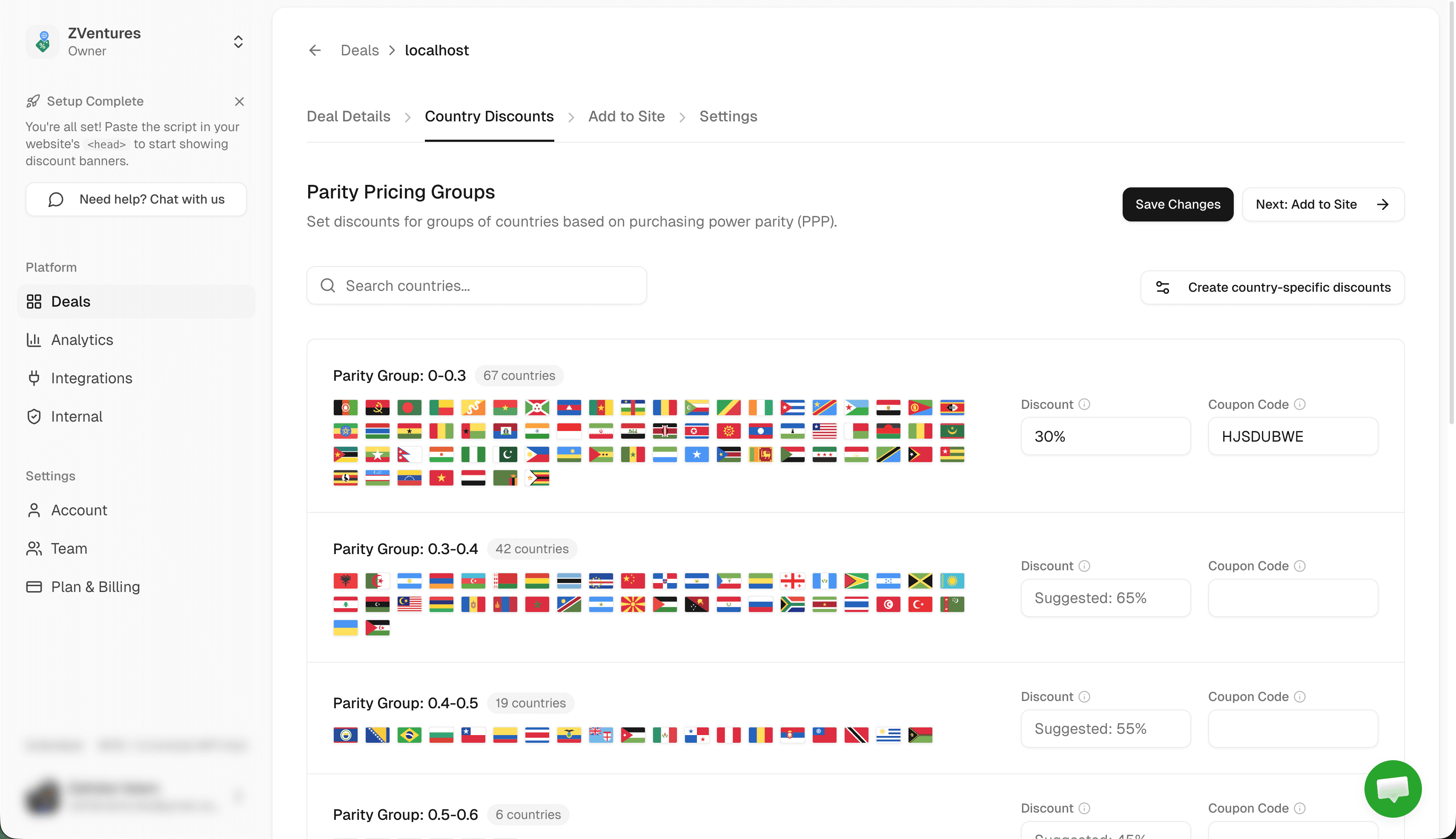
Step 3: Configure Country Discounts in Evendeals
- Go to Country Discounts in Evendeals
- For each country group, set the discount percentage and enter the matching Shopify discount code
- Example: India, Bangladesh, Pakistan get 50% off with code
PPP50 - Click Save Changes
The discount codes in Evendeals must match exactly what you created in Shopify. Evendeals shows the code to your visitor; they enter it at Shopify checkout.
Step 4: Customize Your Banner
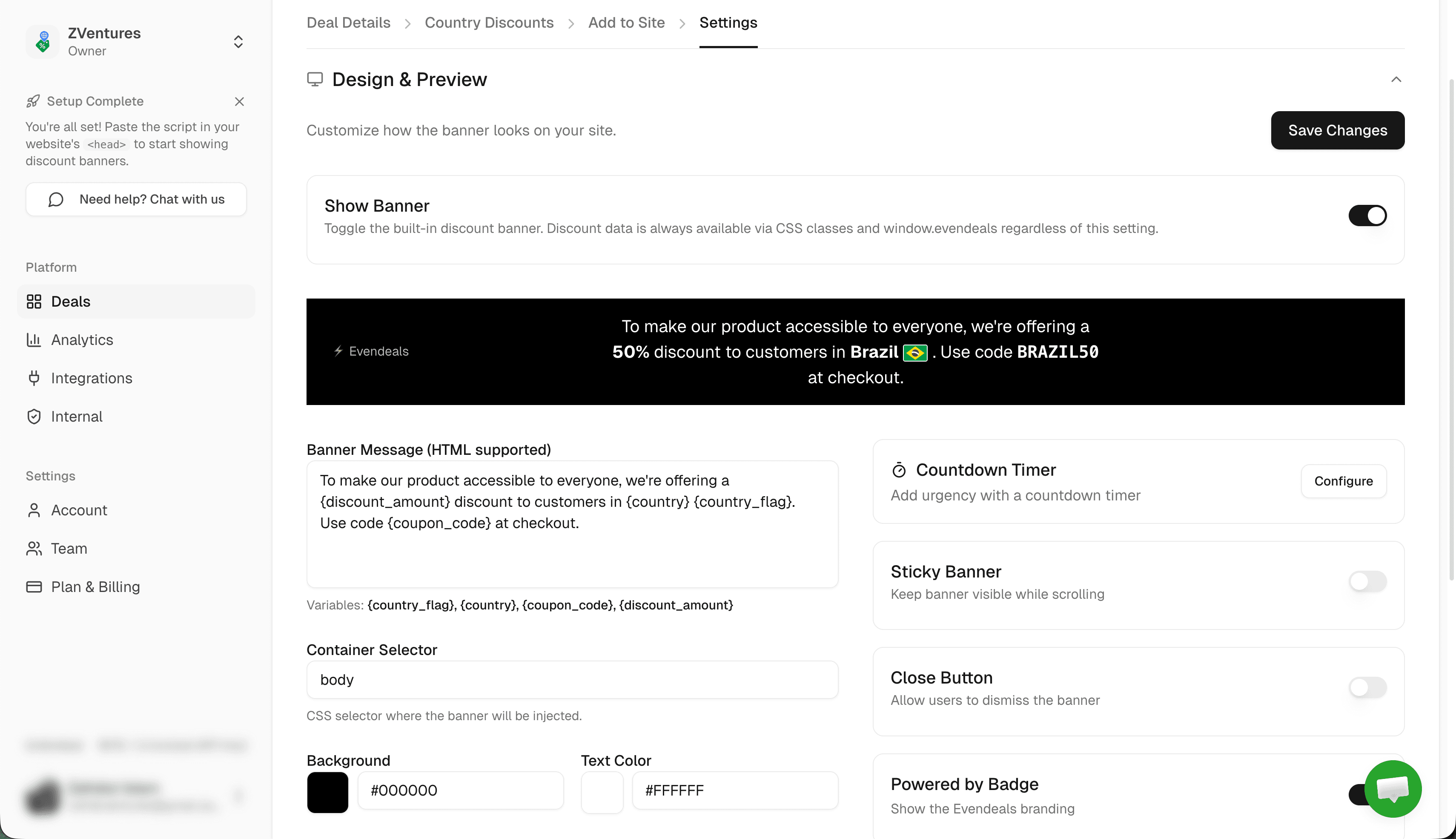
- Go to the Add to Site tab in Evendeals
- Customize colors to match your Shopify theme, edit the banner message, choose top or bottom placement
- Preview how it looks for a visitor from different countries
- Copy the installation script
Step 5: Install on Shopify
- In your Shopify admin, go to Online Store in the left sidebar
- Click Themes, then on your active theme click Actions and then Edit code
- In the left file tree, find Layout and click theme.liquid
- Find the closing
</body>tag (use Ctrl+F / Cmd+F to search) - Paste the Evendeals script just before
</body>:<script src="https://www.evendeals.com/banner.js"></script> - Click Save
Done! The banner now shows to international visitors across your entire Shopify store.
Dawn and other OS 2.0 themes:If your theme supports App Blocks, you can alternatively add the script via the Theme Customizer without editing code. Look for an "Add section" option at the bottom of any page template and choose a Custom Liquid block.
How It Works
When someone from Brazil visits your Shopify store:
- They see a banner: "Special pricing for visitors in Brazil: Get 35% off with code PPP35"
- They click the code to copy it
- They browse your store and add products to cart
- At Shopify checkout, they paste the discount code
- They pay the localized price
Someone from the US sees your regular price with no banner.
Beyond the Banner: Display Modes
The default banner works great out of the box, but Evendeals supports three display modes:
- Banner (default) — The floating banner you just set up. Customize colors, text, position, and countdown timers from the dashboard. Coupon code is click-to-copy.
- Custom Display — Use CSS classes to embed the discount amount and code directly inside your Shopify theme templates, without any banner overlay.
- API Mode — Call the Evendeals API server-side or client-side for full control over discount display. Useful for custom Shopify sections or Liquid templates.
VPN Protection
Some visitors use VPNs to claim regional discounts they do not qualify for. Evendeals (paid plans) automatically detects and blocks VPN, proxy, and Tor connections, so only genuine local shoppers receive the regional price.
Auto-Refresh Coupons (paid plans) rotate your Shopify discount codes automatically after a set number of uses, preventing code sharing on coupon sites.
What You Can Customize
- Which countries see discounts
- Discount percentage per country or region
- Which Shopify discount code each region receives
- Banner colors, text, and position (top or bottom)
- Whether to show the banner on all pages or specific product/collection URLs
- Countdown timers to create urgency
- Click-to-copy behavior for the coupon code
Pricing
Evendeals: Free plan available. Paid plans start at $99 one-time (not monthly).
The free plan lets you test the setup with basic features. Given that international traffic typically converts at under 1% without localized pricing, even a modest improvement on a few transactions covers the one-time cost.
FAQ
Will this slow down my Shopify store?
No. The Evendeals script is 5KB and loads asynchronously after the page, so it does not affect your Shopify store speed score.
Can I show banners on specific product pages only?
Yes. In Evendeals you can target specific URLs. Add only the product or collection URLs you want to show the banner on, and Evendeals will only display it there even though the script loads site-wide.
What if I already use Shopify Markets?
Shopify Markets sets prices at the currency level and requires you to manage prices per market. Evendeals works differently: it shows a coupon code banner that applies a discount to your existing price. The two can coexist, or you can use Evendeals as a simpler alternative to Markets if you do not need full multi-currency pricing.
Do I need a developer to install this?
No. Adding a script to theme.liquid is a copy-paste operation that takes under 2 minutes. No coding knowledge required.
What if I have multiple Shopify stores?
Create a separate Evendeals deal for each store and install the corresponding script in each store's theme.liquid.
Next Steps
Also see: Gumroad, Wix, Squarespace, WordPress, Webflow, Framer.
- Create discount codes in Shopify Discounts for each regional tier
- Sign up at evendeals.com (free)
- Configure country discounts with your Shopify codes
- Add the script to your theme.liquid before
</body> - Watch your international conversion rates increase
Most Shopify merchants see results within the first week after enabling regional pricing. Shoppers from India, Brazil, Southeast Asia, and Latin America are already visiting your store. Give them pricing that makes sense for their economy, and they will buy.
Try Evendeals Free